← Data, API & Backend
Data, API & Backend July 29, 2021 · 15 replies

How do I create categories and filter a list without searching?

Archived from the Bravo community forum (2021–2026). Some answers may refer to older versions of Bravo.

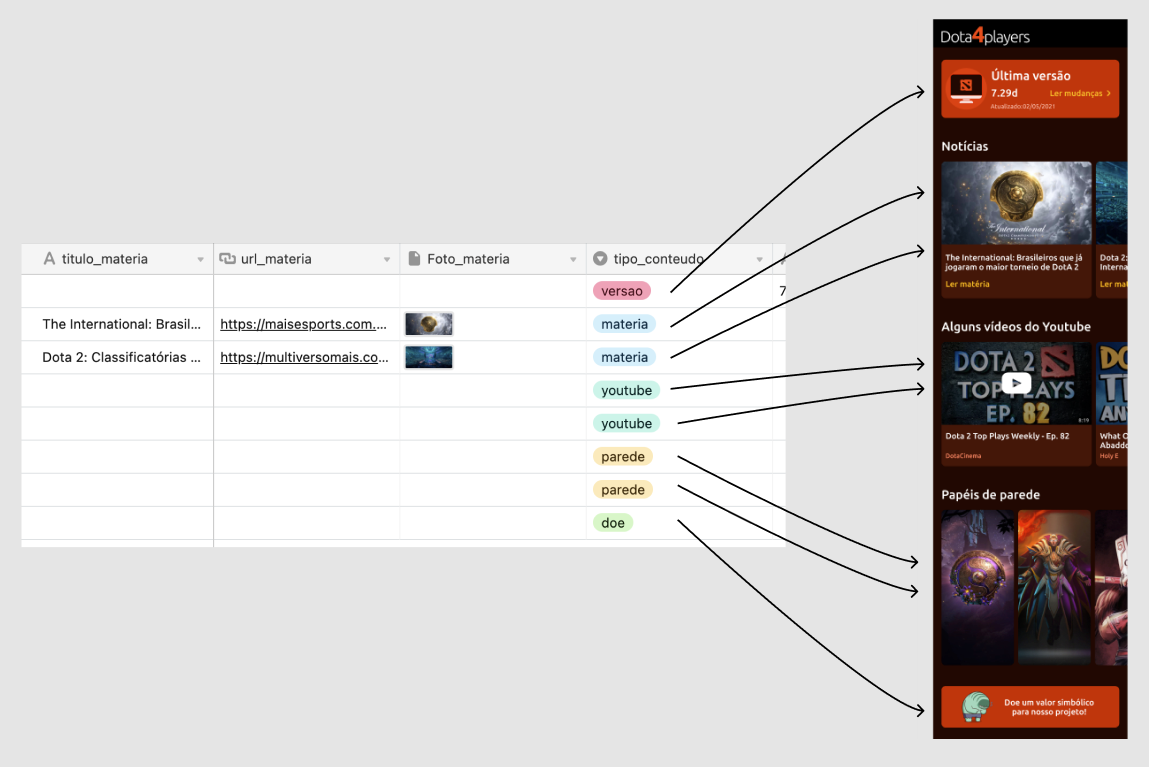
Hi all, when creating a home screen, i want to create 4 titles and direct in the list which Airtable lines will be displayed under each title.

Is there a way to do this?

15 replies
Maycon July 29, 2021

How do I target content on different slides?

image.png

Karla July 29, 2021

Got you! You can create different views on Airtable and filter each view by each tipo_conteudo. Sadly, you can’t loop different contents on the same page using bravo yet :(

Maycon July 29, 2021

It wouldn't be repeating, I would like line 2 and 3 to be on one slider, and line 4 and 5 on another slider, separator by categories

Karla July 29, 2021

that’s a repeat action on the carrossel, you have to loop the list and sadly you can do loop more than one list on the same page :/

Alex July 29, 2021

in that case, woulnd't you have to bind different API queries in the same page? I mean in each page you are limit to one and if you define different queries for each view you won't be able to import all the data. Maybe I am not really familiar with that 😕

Karla July 29, 2021

no, sadly there is no way to bind two different requests on the same page. That’s a bravo limitation. Am I wrong

Alex July 29, 2021

That is what I thought but when I read about views in airtable and filter I become confused because he was going to use it on the same page. Thanks and hope that functionality comes soon 🙂

Dany July 30, 2021

They will release multiple api request on one screen soon :)

Javier Felipe Bravo team July 30, 2021

Yes, multiple binding is not available yet, but we're working on having that feature in the future.

In the meantime, the only way to bind several lists (like in the app case showed) would be setting the backend to return those items in several lists within the JSON body of the HTTP response, then you could bind those lists to different containers in Bravo. That's unfortunately not possible with Airtable, unless you use a connector tool (such as Integromat or Zapier).

Renaud September 14, 2021

Hey  
I believe you can achieve this by using Xano.
You can create one database and - If I'm correct - specify in your GET request how you want the results from your request to be generated (I tried with a boolean and it worked. I guess it's possible with a conditional based on a tag in your database).
Once your datas show up in bravo, you will see different lists appearing and you can map them to the correct container.
I would suggest you to go through this page : https://bravostudio.help/display-data-in-your-app/world-cities-app-with-xano-list-list-detail-page to get familiar with Xano.
I suggest you to play a bit with it (That's what I did, and I ended it figuring things out).

Renaud September 15, 2021

The only thing I couldn't achieve is that the category list headers are linked to a dedicated category page.
I'm guessing it's because I would need a container in which there is 1. a category header container and 2. a slider
Unfortunately, that would make the slider a 3rd level component, which isn't possible.

Leonor April 7, 2022

Hello !

Is this still the only way to display different views of the same list in one page?

Thank you!

Karla April 7, 2022

right now, bravo accepts multiple binds in the same page. But I am not sure this answers your question.

Wrote something in this thread and want it removed? Request removal

Still stuck?

Ask the community on Discord

This archive is read-only. New questions, office hours and product updates now happen in the Bravo Discord.

Join the Discord