With Halloween coming up, here's something we built: my daughter's costume. A Raspberry Pi tucked inside turns her voice into a monster, a ghost or a Dalek. A remote in my hand fires off screams, evil laughs and a fanfare for making an entrance.
I built it in a few days of my spare time by talking to Claude Code, starting from one sentence. I didn't use an app builder like Lovable, Bolt, v0. They're great at turning a prompt into a hosted web app, but a costume needs code that runs on a tiny computer, talks Bluetooth and fails in ways you only see in a device log, so you need something else.
Inside the costume
You talk into a microphone, the Pi changes your voice in real time and a Bluetooth speaker plays it back. There are 18 voices, including monster, ghost, Dalek, giant, cathedral and underwater. An old Google Daydream VR controller is the remote, and every change is announced through the speaker, so you never need a screen mid-party.
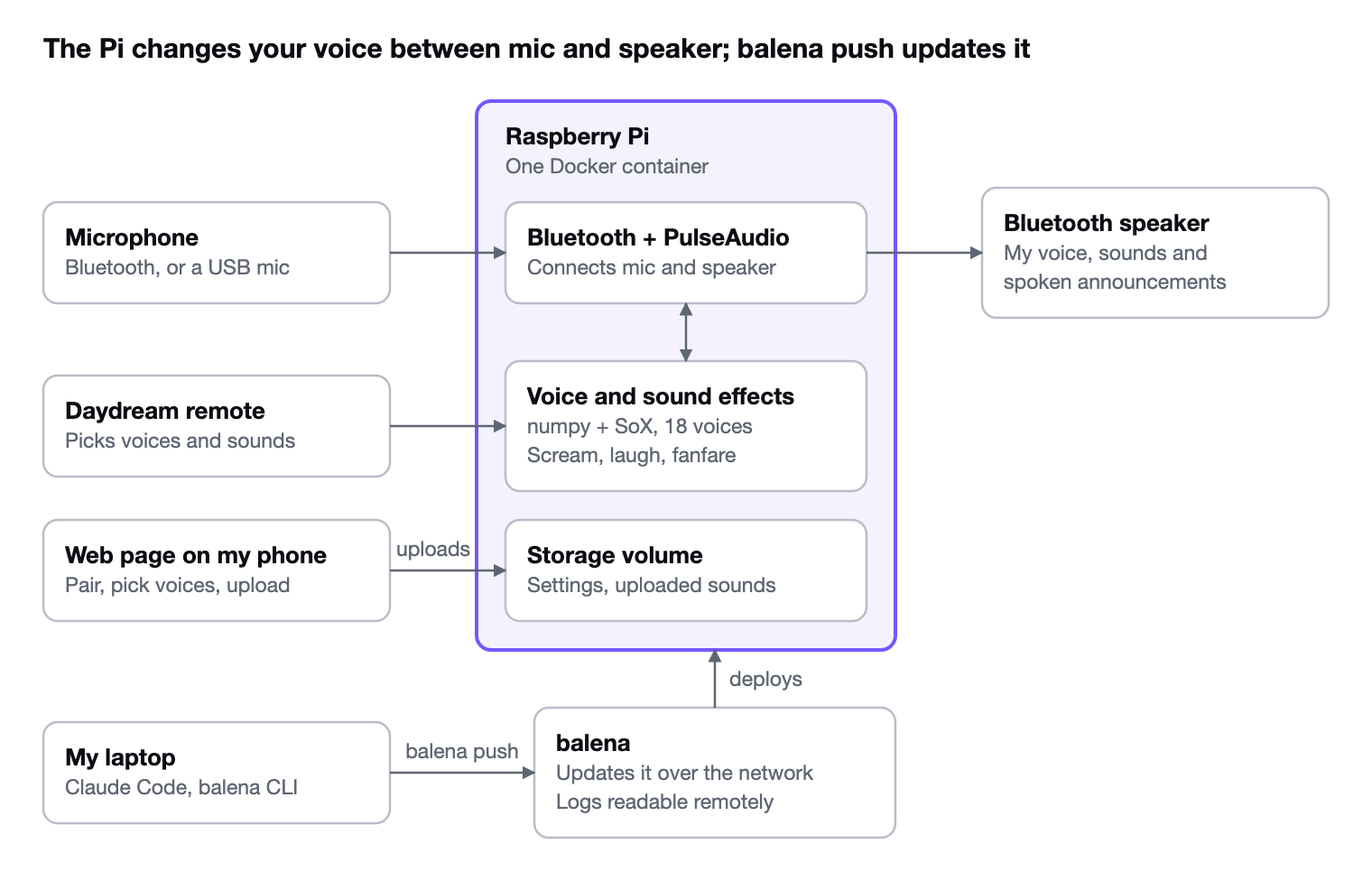
Every piece was picked for a costume: small, wireless, usable without a screen, and easy to update the night before Halloween (although many of the choices were down to what I had lying around the house and lots of other options would work).
Where app builders stop
The difference is reach, not intelligence. An app builder works inside its own project and hosting. AI works in your folder, with your tools and logins, after asking your permission. That's why AI is more powerful inside the conversation than trapped in an app builder.
Troubleshooting shows it best. Uploading sounds from the phone kept failing. With access to every part, the AI read the device logs, reproduced the bug, fixed it in one line and pushed the fix.
| What the costume needed | Lovable-style app builder | AI in my own folder |
|---|---|---|
| Code for a Pi, not a browser | Builds and hosts web apps in its own stack | Wrote Python, shell scripts, Docker config and a web page |
| Bluetooth audio and a VR remote | No access to hardware | Wrote the remote's driver and a diagnostic tool to run on the Pi |
| Spooky sound effects | Can't run scripts on the machine | Synthesized them in numpy and played them on the Mac first |
| Logs from the real device | No access to command-line tools | Read them with my existing balena login |
| Deploys | One-click deploy to its own hosting | Ran balena push and watched the Pi update |
What made it work
None of this needed clever prompting: every request was one quickly typed sentence. What mattered was the setup:
- Run AI where the code lives, so it reads real files instead of my description of them.
- Let it use your tools. The balena CLI, Python and a browser were already on my Mac.
- Give it evidence early. I spent one night pasting Pi output into the chat. Once AI could read the logs itself, a bug took a minute.
- Ask it to prove things: play the sound, test the upload, reproduce the bug before fixing it.
- Keep ownership. It's plain files in my folder and a normal Docker deploy, with nothing to export later.
App builders still provide a lot of benefit when the whole job is a standard web app: forms, logins and a database online tonight, without opening a terminal. For maximum flexibility, like a costume that screams on command, go straight to AI, and add Bravo MCP when you're building a mobile app.
Wait, isn't Bravo Studio an app builder?
Yes it is, and it's still useful when working with Figma, but as more and more users want to build directly with AI, we created Bravo MCP. Bravo MCP works with you and the AI in the conversation, helping to quickly get the foundations of your app built, accelerating the whole process.
How do I build my own?
Point Claude or another AI at this article and it should have enough information to build something similar. If not, contact us and we will see how we can help!
Happy haunting.