← Data, API & Backend
Data, API & Backend May 13, 2022 · 16 replies

(SOLVED 🥳) [action:submit] button broken for anyone else?

Archived from the Bravo community forum (2021–2026). Some answers may refer to older versions of Bravo.

Hi all,

My current issue is that the [action:submit] doesn't go anywhere upon success.

I know its working because I see the form data being added to my Xano Database. And if I switch the mode to "show sucess message" it will show that.

But with "Go to page" selected, nothing actually happens? It just stays on the same page.
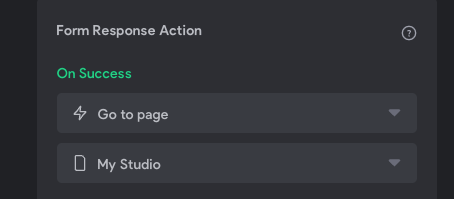
image.png

16 replies

Alex May 13, 2022

Update: I'm noticing it works if I pick a completely different page (like the homepage).

But the issue is if I go back to the tab where the form was open. The form is still open.

Question: Does anyone know if you can use [action] tags in conjunction?

For example, Do I need to say:

  • [action:submit][action:close] >> to close the form?

or

  • [action:submit][action:goback] >> to go back a page, to see the submitted data in the list?
Bastos May 14, 2022

I got the same issue for one of my forms. Could be a problem from Bravo side ?

Brice May 15, 2022

As far as I know there can't be two actions on the same element.

Alex May 15, 2022

Gotcha. Yeah I forgot I started this thread, glad (?) I'm not the only one seeing this issue.

Here is a better writeup of the situation for Support ( )

--
Hi All, Is anyone else having this issue? Or know any workarounds?

Problem: A user finishes a form. Hits submit. And the form stays on the same page but the title disappears?

Problem 2: "Go to page" in Bravo bindings works if I select a different tab than the one I'm on. But if I return to the tab that had the form, it remains open?

Here is the best explanation I could give:
https://www.loom.com/share/b92dec9b21ee400694de2e0db75b6670

retrogatorade May 16, 2022

try the refresh option for your response action instead of 'Go to page'

Alex May 16, 2022

Good thought, but just tried and it just scrolls up to the top of the same form page

retrogatorade May 16, 2022

So when you want the form to be submitted you want the forms to refresh and also go to another page?

Alex May 16, 2022

Yeah Ideally the UX should be:

  1. User views List of journal entries (a page of many past journal entries)
  2. User clicks "add new entry" > form opens > user fills out form > clicks done
  3. User is taken back to list of journal entries page which shows the new entry saved at the top row.

Issue with that: After submitting the form you can only jump to a different page like homepage. You can't go back to the list page. I guess Bravo considers the form & the list page the same page, so it doesn't know where to go?

Alberto Manzano Bravo team May 16, 2022

that should work if your if:
1 - You select "Go to page" in your form ("List of journal entries")
2 - The "List of journal entries" has the [refresh:always] tag

Pau Bravo team May 16, 2022

Double check you've all your parameters in the request bound in the binding page, if there's someone missing the response action that redirects to the previous page could fail. 

You could also tag the fields as required using the latest feature bravo announced, to be sure the users fill in all the needed fields.

Hope it helps

Alex May 16, 2022

🥳 Solution: Create your forms as a modal page! [page:modal] and they will close automatically using [show alert ⚡️] on success page action

Points to for the answer

--
FWIW - I believe there is a bug at the moment with your "go to page" solution. I tried that a few different ways without success. You can see in my original Loom

Alex May 16, 2022

✨ Bonus points: Smaller Image Size

Does anyone know a trick to speed up the [component:input-image] upload in forms? Because iphones take 3MB sized photos my Bravo Front end pinwheels for awhile while the form loads the input-image

Is there a way to have the frontend [component:input-image] only load a smaller size? I haven't figured out how to compress images before sending them to Xano, so any tips there would be great too :D

Jacob May 23, 2022

I haven't tried this yet but maybe choosing the Thumbnail URL which is supplied in the Requests response will result in a smaller image being loaded? I've been facing the same issue

Bastos August 20, 2022

Problem has been solved for me with sending user on a "validation" page with a button [action:close]. Not the workflow I wanted but.. it works now.

Wrote something in this thread and want it removed? Request removal

Still stuck?

Ask the community on Discord

This archive is read-only. New questions, office hours and product updates now happen in the Bravo Discord.

Join the Discord