Archived from the Bravo community forum (2021–2026). Some answers may refer to older versions of Bravo.
Hello everyone,
I am wondering if there is a way for me to automatically log my user in as they press the "create my account" button.
From what I saw on the custom auth documentation, It is mandatory to redirect them to the [page:login] screen, and it is not ideal for the user experience.
(ps: I'm using XANO)
Have a good day !
25 replies
Unfortunately I don't think that's possible at the moment.
I'd be happy to hear if the Bravo team updated this feature 😊
Hi &
▶ Video: RPReplay_Final1652183684.MP4
It is not mandatory to redirect them to the login page. I have just implemented the same scenario you want in my app. *video attached. So the solution is:
1- In your signup page, use [action:login] instead of [action:submit]
2-In data binding, make sure to select Set Access Token as the action on success.
then you are good to go 🙂
Hope that helps.
Cheers!
Nour
and here is a screenshot
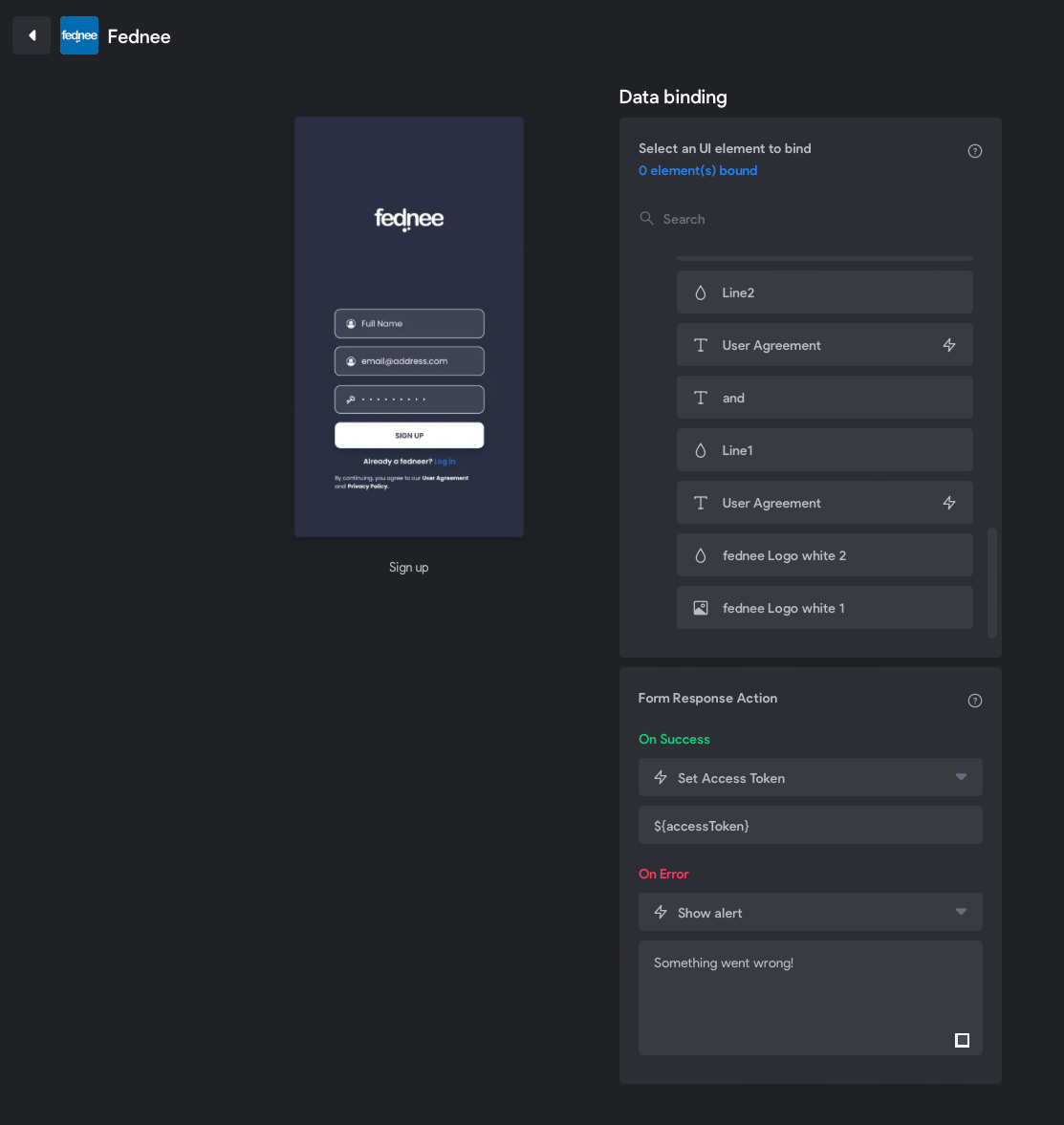
This is excellent! Thank you for sharing 🎉
Always a pleasure!
Thank you for this customized tutorial 🙂
Btw, I dowloaded your app to see what you are building, and I'm pretty impressed... Have you done everything using Bravo x Xano ? or are you using other tools ?
Thanks Robin 🙂...what you have downloaded is actually an older version. It is not built by xano or bravo. But the video I attached in my answer above is for the newer version that I built using xano and bravo. I am planning to release it before mid of June.
Ok nice ! Good luck for the final stretch then, I'll be an early adopter 🙂 ! And thanks for your help !
Thank You!
[EDIT : NEEDED TO CLICK AGAIN ON "SAVE" UNDER CUSTOM LOGIN TO REACTIVATE IT, IT WORKS NOW]
I'm currently working on it, just to be sure I understood everything correctly :
On figma :
- You duplicated the login page
- Deleted the [page:login] tag
On bravo :
- Exact same as the login page
Am I right ?
Because by doing this, nothing is happening on front-end. (but works on backend). I can't redirect the user to the homepage.
I assume you updated the form response action to (Set Access Token) and added ${accessToken} ? and make sure you type the accessToken manually, do not copy and paste it...support is aware of that bug.
In fact I managed to solve this problem by re-clicking the save button under settings -> custom login !
Everything works fine now 🙂
Super!
you have a solution for handling a signup wall in the middle of the app (ex: while favoriting) using bravo + Xano?
I have implemented another sign in process (not sign up) in the middle of the app after bypassing the sign in page and that is in case the user forget the password using sendgrid/magic link. The funny thing is that today I was thinking about adding another (signup wall) as u explained but in a different senario. I will see if I can manage and let you know.
Hi Nour - correction - its a sign in - social like facebook. (we just call is sign up wall :). Its especially helpful if you like the users to simply explore the app without any restrictions..but when ready to save/favorite or interact then we want them to sign in and if they don't have an account to sign up but still using a social auth. would be great to know if you come up with something! thx
I just tried your implementations mentioned above but didn't seem to work.
Error: I instead get my custom "on error" response when hit click "sign up".
Clues:
1. I tried tip on "re-clicking save" but didn't make a difference.
2. I can Sign-in with the created account. So its clearly creating the user. But I can't get it to do the tokenization in 1 step like Nour figured out.
3. I have separate post requests for "Post: Signup" or "Post: login" - your hack still works the same for this?
Any tips?
&
Funny enough I met with support and they weren't aware that its possible to sign-up/login in one step! They said they only believe you can do it in two steps.
I wasn't able to implement it in my app, so if either of you have time this weekend and can give a bit more detail/walkthrough it would be super helpful!
In my analytics I see lots of users sign-up but end up losing focus and not login. Maybe they think it's a bug, or it's just too much friction. But either way the UX would be way better in what you describe.
Lets have a zoom meeting tomorrow and get this fixed. Cheers! Nour
Amazing! I'm my calendar is here:
https://calendly.com/palette-wellbeing/palette-meeting
maybe we should host our meeting in fednee 😉
lol maybe next time - because unfortunately i'll probably have my keys on the screen if we screen share 🤫
sure! just so u know, we have all the collaboration tools integrated in fednee 😉 screenshare, whiteboard, trello and all for free :😃
Thanks for sharing this man, just saved my app's life!
Its awesome right! I know its not officially approved by Bravo Support, so would be cool to get the nod from them they won't break this trick in any future updates
Wrote something in this thread and want it removed? Request removal
Ask the community on Discord
This archive is read-only. New questions, office hours and product updates now happen in the Bravo Discord.
Join the Discord