← Data, API & Backend
Data, API & Backend July 13, 2022 · 13 replies

Advanced Search - App Monster

Archived from the Bravo community forum (2021–2026). Some answers may refer to older versions of Bravo.

Hello All,

I'm coming back to a recurring issue you can find in my post history. After many attempts and taking some time away I've come back and I think I have figured out that the only way to implement our apps somewhat unique function is through advanced search.

I followed App Monsters guide on advanced search but it seems to be outdated and no longer applicable to Airtable's tags.

I have found several key differences from when he made the video and today some minor that I'm not sure if they matter and some, I believe are major.

Minor Changes:
Referencing Tables uses a different name in the API link; he used "Posts" but I think you need to use a more specific line, mine was auto generated by airtables.

He mentions several times your variable will change to blue in Bravo's API collection, if you format correctly but I think this has changed as well as I followed it exactly and it did not change. I also have other working variables that aren't blue

Major Changes:
App Monster uses the filterByFormula from Airtables in his API, but I don't think Airtables supports this function any longer as I cant find it listed and when run I get the following message
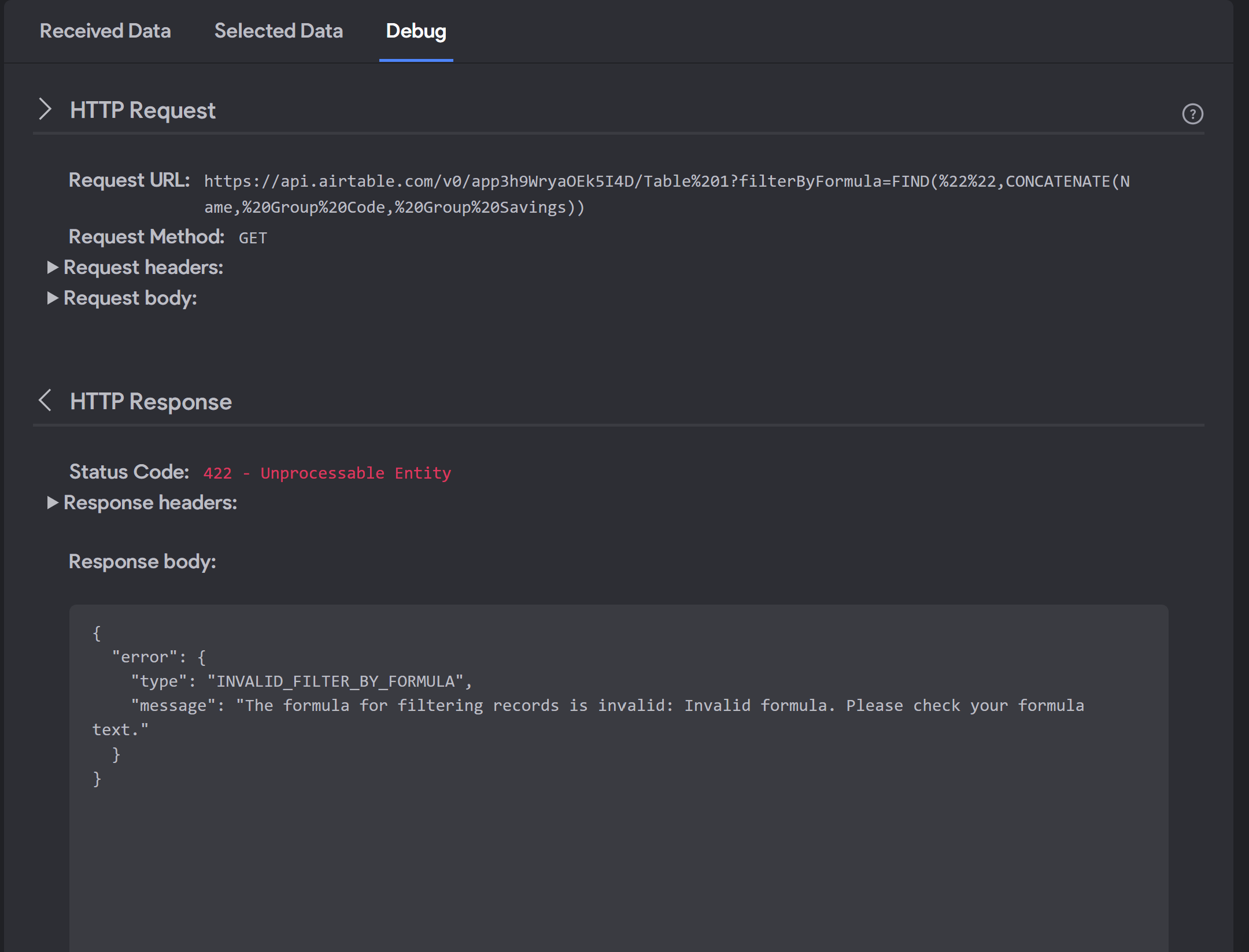
Screenshot 2022-07-13 132646.png

In addition he mentions you could also use the Search function however this returns my entire array without filtering anything:
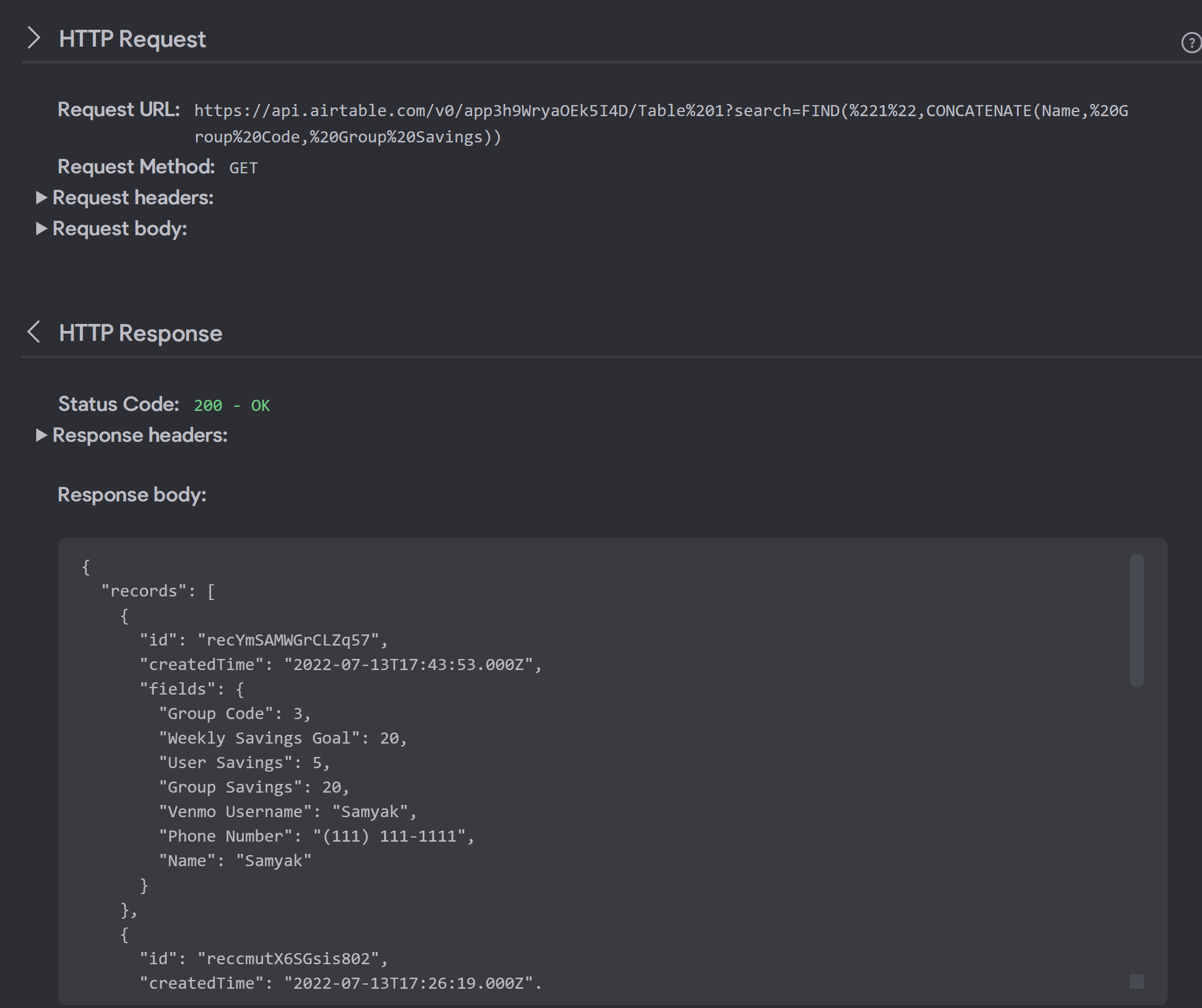
Screenshot 2022-07-13 132828.png

And this is what I inputted for the last picture that returned an array

https://api.airtable.com/v0/app3h9WryaOEk5I4D/Table%201?search=FIND("${Searchinput}",CONCATENATE(Name, Group Code, Group Savings))

I would appreciate any direction on this issue, we've been struggling to figure out how to implement this for weeks. I can also provide more information if needed.

What we are trying to do is quite simple as outlined in previous posts, we just want the user to be able to look up their group code, and then return the group savings associated with that code. We dont want them to look through a list of other group savings hence GET List -> GET Detail wasnt ideal, and advanced search is the only way I can find of doing this

13 replies

Valter July 14, 2022

On app.monster video, everithing it's still up to date.

Buck July 14, 2022

What about all the stuff I showed that was different?

app.monster July 14, 2022

Hi,
you are right, that Bravo no longer highlights the variables in a different color but that has nothing to do with the variable itself as you have already found out. The rest of the video still applies as Valter mentioned.
A search function like you have used it in the second screenshot doesn't exist. What I meant in the video is that you could replace "find" with "search" as you can find in the link in the description of the video: https://support.airtable.com/hc/en-us/articles/203255215-Formula-field-reference
In the first screenshot, you can see that you don't have a keyword you are searching for. This way Airtable obviously can't find anything. Try putting something between %20 and %20

Buck July 14, 2022

I'm trying to do as you say but no matter what it returns "filterbyFormula is an invalid formula" plus you can see it is no longer on Airtables formula page. Only completely replacing "filterbyFormula" with something else like "search" allows a successful response. In addition you pointed out the formula in screenshot 1 is wrong however this what the formula looks like for screenshot 1  | https://api.airtable.com/v0/app3h9WryaOEk5I4D/Table%201?filterByFormula=FIND("${Searchinput}",CONCATENATE(Name, Group Code, Group Savings))  - It simply returns as the incorrect one in the HTTP response box and I don't know why.

app.monster July 14, 2022

Do you have a correct sample input in Bravo? Seems as if it were empty. Also, would you mind sharing where you found that "filterByFormula" is discontinued? It still works for me and the Airtable API encoder features it too.
You get a successful response with search because that is not a keyword so Airtable ignores it. That's also the reason why it's always the same response as the normal request

app.monster July 14, 2022

Another thing you could try would be removing all the Spaces from your table names. Good practice for names would be something like GroupCode or GroupSavings. But make sure you have it in both places (Airtable and your request URL in Bravo)

Buck July 14, 2022

I just meant on the pages with all airtables formulas filterbyformula is nowhere to be found on it, and the fact that my response keep saying invalid formula lead me to believe its no longer supported. And yes I have used several sample inputs such as "1" "2" and "3" all of which should filter to group codes but it either pulls everything or nothing

Buck July 14, 2022

This is may be the problem actually as I have spaces in my table names, let me try changing that and see if anything works!

Buck July 14, 2022

I tried fixing the spacing issue on Airtables and tried implementing all of your suggestions however the filterbyformula still fails everytime and when switch to "search" or "find" it does work but returns everything instead of only items with my search term

app.monster July 14, 2022

I was just making sure you tried it with a sample input because the error from your screenshot came from not having any input. In hopes to make it clearer to you: filterByForumla is not referenced because it's not part of a formula it's basically like a wrapper that tells Airtable that a formula is following. Can you send a screenshot of your response with the sample value, please? It's hard to debug when you just say everything is correct but there is an error.

Buck July 14, 2022

I thought it would be easiest to just send a Loom video. I don'r really understand what has changed since the formulas I sent you originally but the filterbyformula is magically working now, however I still have the issue where nothing is filtered and instead I get the whole array. I also showed what our airtable looks like in case that is relevant

Link: https://www.loom.com/share/9285a8b253ab43fd96473b1cb537d0e1

app.monster July 15, 2022

I have it pretty much the same way. The only thing I can recommend now would be to create a new request (don't duplicate!) and paste the URL again but this time without variables first. This way you can get rid of the id that you still have in there. Might be that Bravo cached something which is now conflicting. If that doesn't solve it, it's time to head over to the Airtable forum.

Wrote something in this thread and want it removed? Request removal

Still stuck?

Ask the community on Discord

This archive is read-only. New questions, office hours and product updates now happen in the Bravo Discord.

Join the Discord