← Data, API & Backend
Data, API & Backend July 17, 2022 · 7 replies

BEGINNER: Connecting specific app categories to templated details page with API GET request.

Archived from the Bravo community forum (2021–2026). Some answers may refer to older versions of Bravo.

Hi! 

I am a beginner and new to both app creating and specifically API. 

I want to create a category page with differently designed categories (different colors and vectors) like the photo below: 
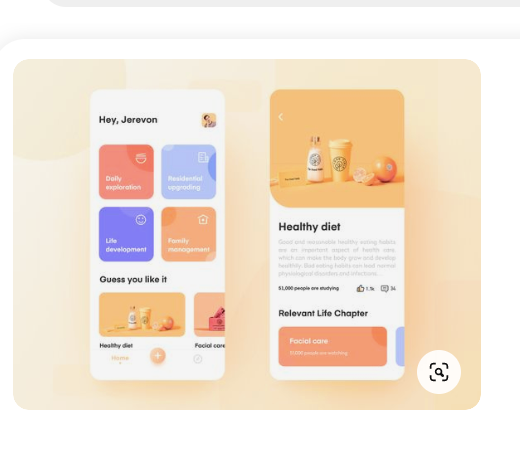
Skärmavbild 2022-07-17 kl. 10.40.03.png

When the user clicks on to category I want an article-like (details page) to come up that I want to connect to an air table. I have created a template of the details page and want to set up an Airtable. My question is:

How do I connect specific list items (category) to a list of details pages on Airtable? 

Sorry if the explanation is a little confusing. 

Thank you in advance!

7 replies

Zara July 17, 2022

Hi!
Thanks for the fast reply. I have read the instructions and help guides but can´t seem to find the solution to my specific question. Like how do connect the list item to a specific row, that i have of my articles on Airtable.

app.monster July 17, 2022

Do you want to generate the list of categories dynamically? In that case dynamic colors wouldn't be possible. If you make them static you can keep your design and the request would be a simple list/detail. However, it only makes sense if you keep those four categories

Zara July 17, 2022

Yes, exactly i want the catagories to be static and have the set 4 catagories. Can I keep my articles of the different catagories together in one Airtable view and, if so, how do I specify which row of data the API should get? Thanks!

Divyansh July 18, 2022

make a container frame for your 4 box cards (make frame size which will fit these 4), leave it empty for now.

then make a view(Airtable) dedicated for these 4 cards, take screenshots of each card's design (or you can make a 512*512 image), 
then each row in this view will contain columns :- background image , text.

Then in your figma, make only 1 card inside that frame which I mentioned you, now connect it with Airtable API (hoping you know you have to make another API GET request which will have the ID to link for details). I am hoping this would work 😄. 
Rest there are more pro guys that can surely correct me or help you 🙂

Zara July 18, 2022

Thank you everyone for the advice! I will try everything and get back to you if i run into any problems :)

Wrote something in this thread and want it removed? Request removal

Still stuck?

Ask the community on Discord

This archive is read-only. New questions, office hours and product updates now happen in the Bravo Discord.

Join the Discord