← Data, API & Backend
Data, API & Backend August 22, 2022 · 12 replies

Button states problem

Archived from the Bravo community forum (2021–2026). Some answers may refer to older versions of Bravo.

Hi, in my screen the user should be able to pick up only a gender option. I defined a "default" and "active" status for each button through Figma component and I managed to correctly connect it to the API. Problem is if the user touches on multiple buttons they all get to "active status" , instead I would like to turn off all the other options while the user is selecting one. Do you know how to get this?
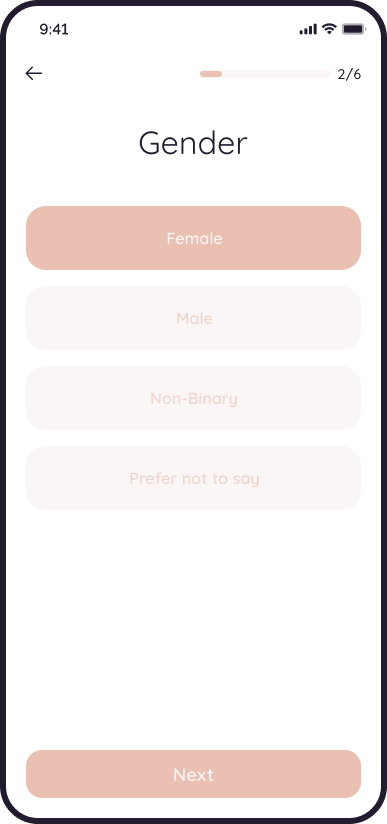
Screen template.png

12 replies

Cam August 22, 2022

Without the button updating an API and the page being refreshed, idk how that would be possible. (Even though it'd be awesome.) It seems to me that tracking state is passed to the API-side, and then the UI reflects that state. 

One way to possibly do this is to POST or PUT to an API when they click the button, have the page refresh, and then it'd update and show active for the active button. Not the best dev experience, but it may work

Bastos August 22, 2022

I think it’s not possible. You can only control visibility of objects with your backend. And as Bravo doesn’t give the status of a button in real time, you can’t change other objects statuses in the meantime.

Fred August 22, 2022

but that would result in the button triggering actually two actions? It seems that Bravo allows one action only

Cam August 22, 2022

Hmm... Great thinking. Let's say that you had the button do the action and the container had [refresh:always], would that work?

Divyansh August 24, 2022

There are 2 ways to solve this:- 

  1. This can be solved with little design changes, just you dont have to add a "next" button and instead a "next" button popup (beautifully designed) and connect each button options with this popup, i.e. whenever user clicks on any option and the state changes as normal and popup appears for conformation (the "next" button).
  2. Another way is also good, just make a form, either a bravo or from any 3rd party. All your 6 questions would be covered there, and choose multi-option display with single select method (feature) for this one.
Fred August 25, 2022

Exactly ! The number 1 is the solution I came up with too  and it works, the loaders takes a bit but is okei

Em August 26, 2022

Hi  ,
Could this be what you're talking about. If it's only about one active state at a time it's very possible. But if it's about completely disabling the other elements you may need some active API calls each time to pass the states to the backend. Will greatly affect your UX.

I've set this up for my menu, If this is what you need I can share the Figma set up.

▶ Video: Active_States_Bravo Vision.mp4

Fred August 27, 2022

this is brilliant! yeah what I need is just an active state at a time! Can you share your FIgma? I'll be super grateful!

Em August 29, 2022

Hi ,
Please dm me your email I give you access to this screen.

Jacob October 8, 2022

Hi  , I am also looking for this solution, could you please share via DM? Thanks!

Wrote something in this thread and want it removed? Request removal

Still stuck?

Ask the community on Discord

This archive is read-only. New questions, office hours and product updates now happen in the Bravo Discord.

Join the Discord