Archived from the Bravo community forum (2021–2026). Some answers may refer to older versions of Bravo.
I'm not sure the best way to go about this.
I'm using Xano if that helps.
I have items, categories, locations, and lists.
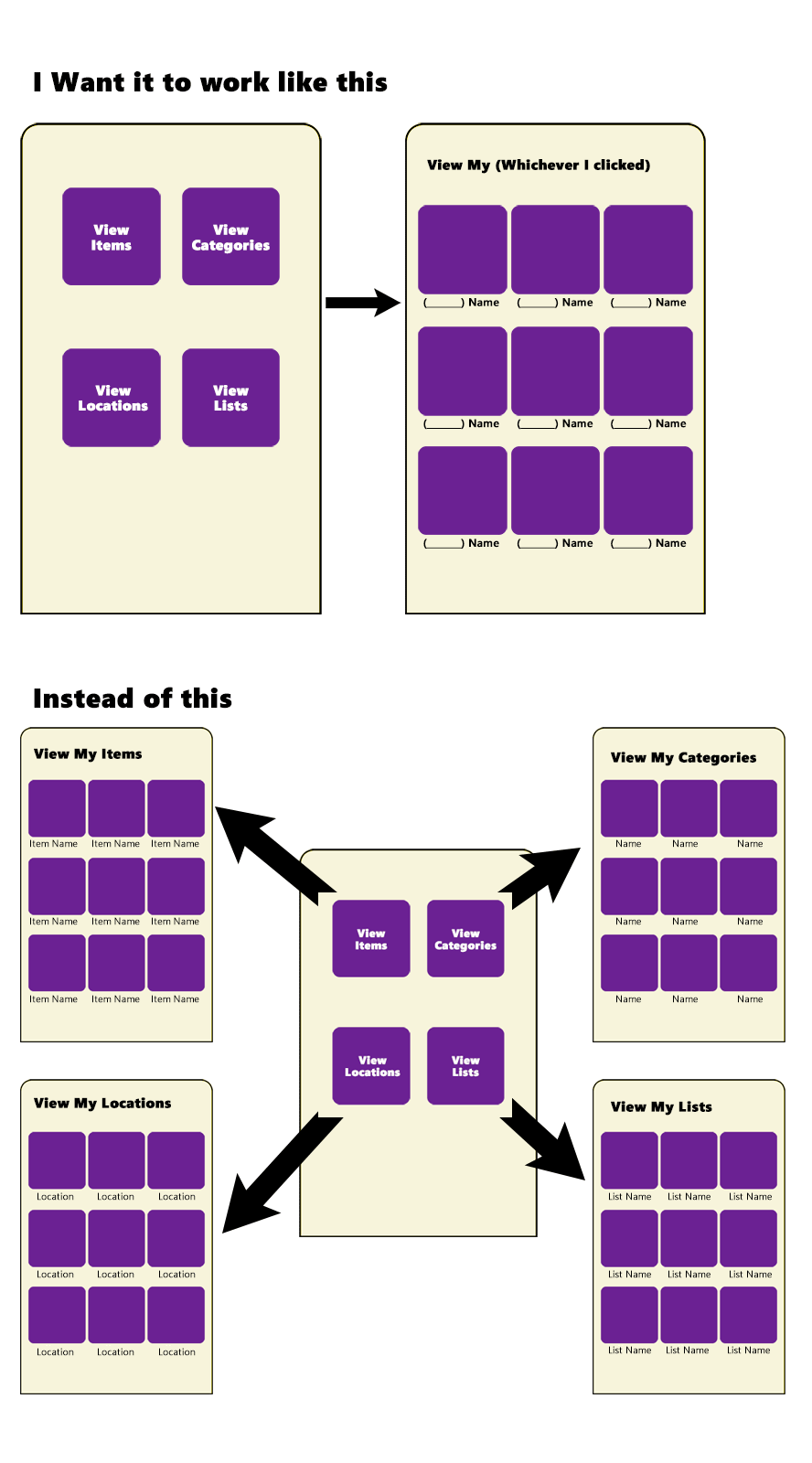
I'd like to have one screen that loads a tile of "My Items", or "My Categories", or "My Locations", or "My Lists"
Under that, I will populate cards of all of whichever data is sent that matches.
The layout cards and the names on the cards are in the same format and layout across all four options so it would just be grabbing differently named data fields to populate the images and then the names.
This currently works fine by setting up 4 different screens and sending the corresponding button push to the appropriate screen, but I'm trying to save screens.
Is there a tutorial for something like this?
2 replies
Wrote something in this thread and want it removed? Request removal
Ask the community on Discord
This archive is read-only. New questions, office hours and product updates now happen in the Bravo Discord.
Join the Discord