← Data, API & Backend
Data, API & Backend July 21, 2022 · 7 replies

!!! Connecting WooCommerce to Bravo Studio?

Archived from the Bravo community forum (2021–2026). Some answers may refer to older versions of Bravo.

Hello!

I am trying to integrate the WooCommerce API into my app on Bravo Studio. I did lots of research and reviewed some posts published in this space but did not find any solid response. So I have a theory...

I am planning to use Backendless as my backend framework for my app. On Backendless, I learned that Backendless and WooCommerce can be integrated using no-code automation tools such as Zapier.

So if I connect WooCommerce to Backendless using Zapier and then connect the Backendless API to Bravo Studio, will I be able to use my WooCommerce database to display my products, content, track sales... etc.? 

Please let me know if this would work. Thank you!

7 replies
Divyansh July 21, 2022

Hi  yes this will work, actually I have done this, but similar, and used, tested and tried both "Make" and "Zapier".
So I did not used WooCommerce but another powerful 3rd party API and instead of Backendless I used Airtable, 
So here is what I did :-

  1.  I got the REST api url (general without query strings) :-

(query strings are the parameters which start after "?" in your URL, you don't have to pass it in URL since Zapier or Make will automatically encode them)

2. In Zapier you have to use "webhooks by Zapier" and select (GET, PUT, POST etc) or in Make you have to use "HTML" integration.

3. In your database, make columns for query parameters,
    example -
if the API takes product = xyz, age = 23 etc,
   you have to add product and age as columns in your table.
(this is the reason we do not pass query strings in the URL as mentioned in step 1)

4. Now you have to connect first your database table to get the columns and connect them to webhooks or HTML in Zapier or Make resp.

5. Then you have to connect this again to your database, either you can update your table or add new rows with the output you received.

Then you can display a GET API of backendless in the Bravo App.

In short :-

Backendless -> REST API (woocommerce) (pass query parameters and key) -> Update Backendless (with output from previous step)

Hope this helps, I actually devoted 5-6 days for this, seriously did lot and lot of web mining for this, learnt by my self and now I am clear with everything and how 3rd party API can be integrated, seriously this is amazing like we can do ANYTHING, just a REST API is what is required (or jdks who like them)

Friendly advice - use Make (it gives 1000 API call for free vs Zapier which is 100) (plus you cant use webhooks in Zapier in free account)

Taha July 21, 2022

Thank you for your advice! I will try out your method and will make sure it works out!

Stéphan July 21, 2022

I am currently in this situation. but I wanted to make it simple by creating a site (woocommerce) and using the bravo studio WebView. your explanations are really helpful

Stéphan July 22, 2022

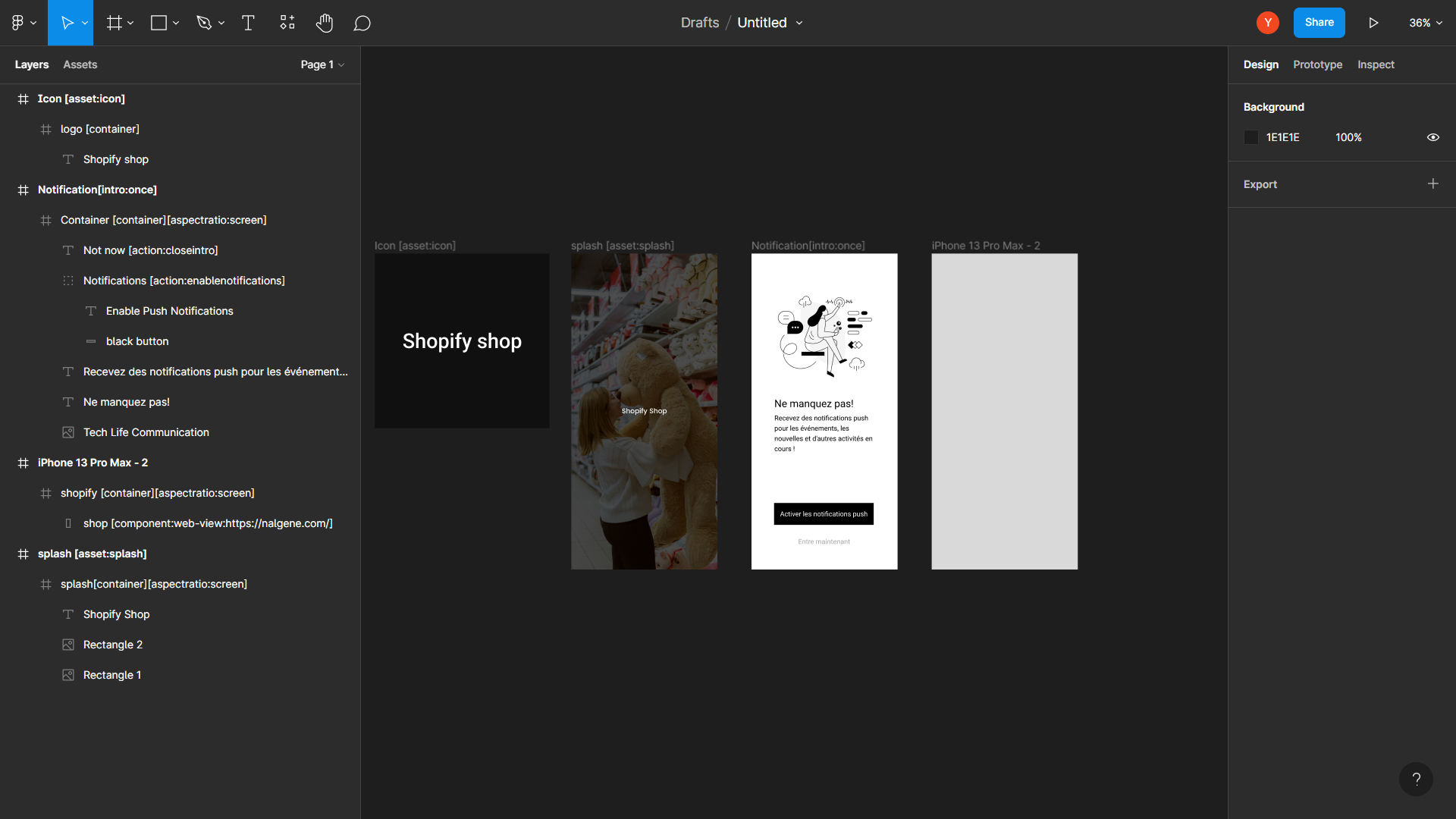
I tried to make an example with a woocommerce and shopify site. I created three iphone pro max frames plus an asset icon
1 - frame: Icon [active: icon]
2 - frame:splash [active:splash]
3 - frame: Notification[intro:once]
4 - frame:shopify[container][aspectratio:screen] with webview.

It works great in mobile mode and workable to build an app with bravo studio without really going through multiple integrations. everything will depend on the theme used when creating your woocommerce or shopify site

Untitled – Figma - Google Chrome 22_07_2022 10_07_45.png

▶ Video: 20220722094220.mp4

Wrote something in this thread and want it removed? Request removal

Still stuck?

Ask the community on Discord

This archive is read-only. New questions, office hours and product updates now happen in the Bravo Discord.

Join the Discord