← Data, API & Backend
Data, API & Backend September 25, 2022 · 2 replies

Create a second Action:submit, or action:remote that submits?

Archived from the Bravo community forum (2021–2026). Some answers may refer to older versions of Bravo.

I have an "edit item" page.   I want to be able to update some of the text inputs, (item_name for example) and stay on the page, but when the primary submit button is pushed I want it to re-direct to the view item page. 

I have two action submits on the page which works fine, but it seems I can't set one to refresh, and one to view item,  if I change either the other changes also? 

Initially I tried to just do an action:remote and update the input row.  The API post works fine in the preview, but in the app it doesn't update.

My guess is it's pulling item_name from the db record, rather than the input field so it's updating back to itself.  

So any idea how to;

A. pull from the input field to update with action:remote. 
or 
B. set two action:submit actions on a page with different "on Success" instructions?

2 replies
Valter September 25, 2022

The action:suit will update all the onputs that you have on that page. It does not meter if tey are on diferent containers or if you have 2 or 3 action:submit buttons, all of them will act as one. If you have empty input fields they will be updated empty on the backend. Recomend the you use visible values on the input fields to avoide this

Casey October 3, 2022

Thanks Valter, did you mean the action suite? as in all of the action commands?

I think the only possible options I would have would be action:submit, and action:remote right?

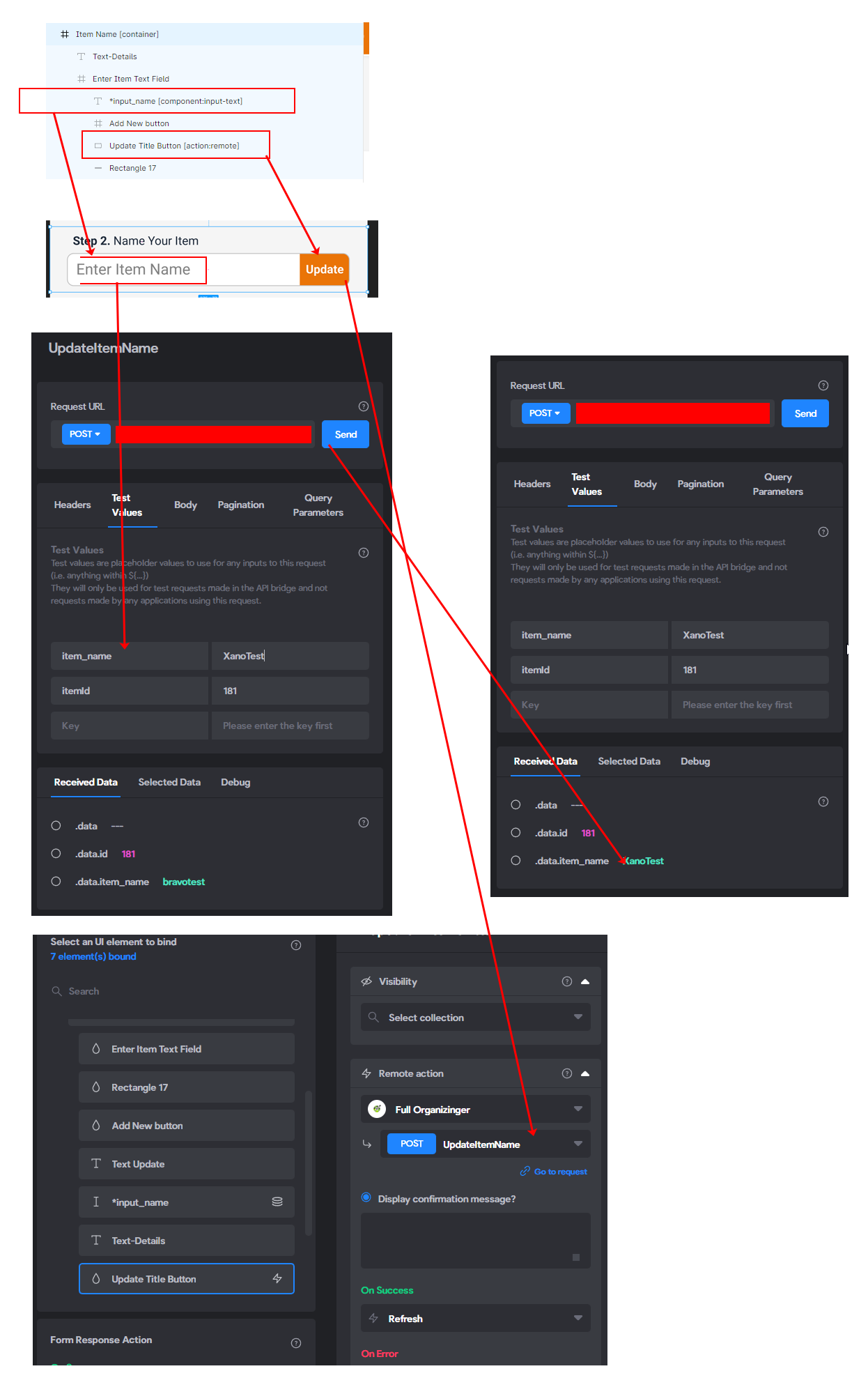
Hopefully this breakdown will help someone spot what I'm doing wrong?

When I change my action:remote to an action submit this works fine.

When I run the API test, it works fine.

But when I change to action:remote, and hookup the fields, it just updates with whatever is currently in the database and it ignores whats in the input-text field?

Is there a way I can grab the current typed contents of the input-text field with this action:remote and use it to submit it?  It doens't appear I can?

name-update.png

Wrote something in this thread and want it removed? Request removal

Still stuck?

Ask the community on Discord

This archive is read-only. New questions, office hours and product updates now happen in the Bravo Discord.

Join the Discord