← Data, API & Backend
Data, API & Backend November 2, 2023 · 5 replies

Filter (not search)

Archived from the Bravo community forum (2021–2026). Some answers may refer to older versions of Bravo.

Hi community,

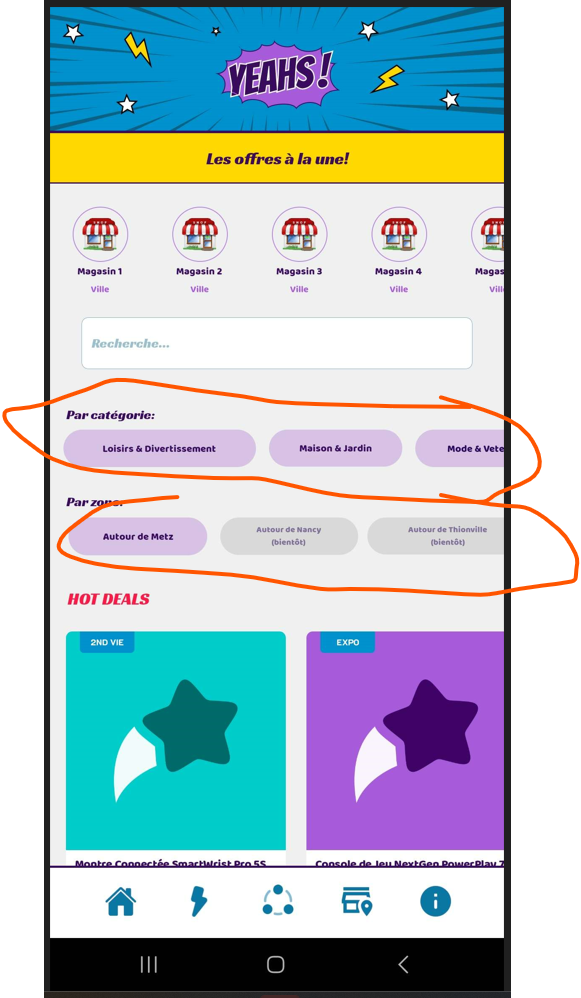
Is there a way to create category or location filter?
The only one I found is to make some word search.

Currently, I linked each item to an another screen, which individual list of product regarding the category or location.

But I can imagine that there is a feature able to deal with this kind as filter without doing it manually isnt’it? 😊
5 replies

Karla November 3, 2023

Yes, you can do that, just need to create another page which shows the right results.

Gauvainh November 5, 2023

Hi , thanks for replying!

I mean that's what I did but I would like to avoid to create multiple screen as I could have a lot 
I was looking for something which could maybe search for the text when you click on it
And allow multiple filter, as a normal application I would say

In this example: you could select a location & a category

Thanks :)

Karla November 5, 2023

I have added it to feature request, you can upvote it. Today, that’s the only way.

Riccardo December 8, 2023

I`m doing it by setting up filters using true/false toggles where the
users can select multiple filters and the result page is called using filterByFormula in airtable ...
now I finished a version using a Firebase cloud function and Algolia

Wrote something in this thread and want it removed? Request removal

Still stuck?

Ask the community on Discord

This archive is read-only. New questions, office hours and product updates now happen in the Bravo Discord.

Join the Discord