← Data, API & Backend
Data, API & Backend October 26, 2023 · 3 replies

Persist variable value across multiple screens

Archived from the Bravo community forum (2021–2026). Some answers may refer to older versions of Bravo.

I am developing an app that has a user avatar displayed at the header. The app has 4 screens that are connected via a tabs menu (i.e. Home, Activities, History, Settings). The same user avatar should display in all these four pages, which is dependent on what user has logged in.

The user avatar is displayed correctly in the Home screen, but doesn’t show up in other (Activities, History, Settings) screens.

I believe that the variable I am using ${userID} is only passed from the Login screen —> Home screen, but doesn’t keep passing to the other screens.

Does anyone have an idea of how I can keep the state (value) of a variable, so I can keep using it in other screens?

Thanks for any help!

3 replies
Diego Iglesias Bravo team October 27, 2023

Hey Jaime, you need to have a request set up that fetches data of logged in user, usually "/auth/me" or similar that returns the avatar. Then you just bind the image variable from that request to the UI element to display it (on every screen).

${user.id} is a global variable that is available on all screens, but you need to bind a request (using that variable or not) to actually display data.

Let me know if I clarified your question.

Jaime October 27, 2023

Hi Diego! 

Thanks for the reply. I am able to return the avatar for the first screen (Home) but not for the other screens (Activities, History and Settings) which are reached via the menu tabs. 

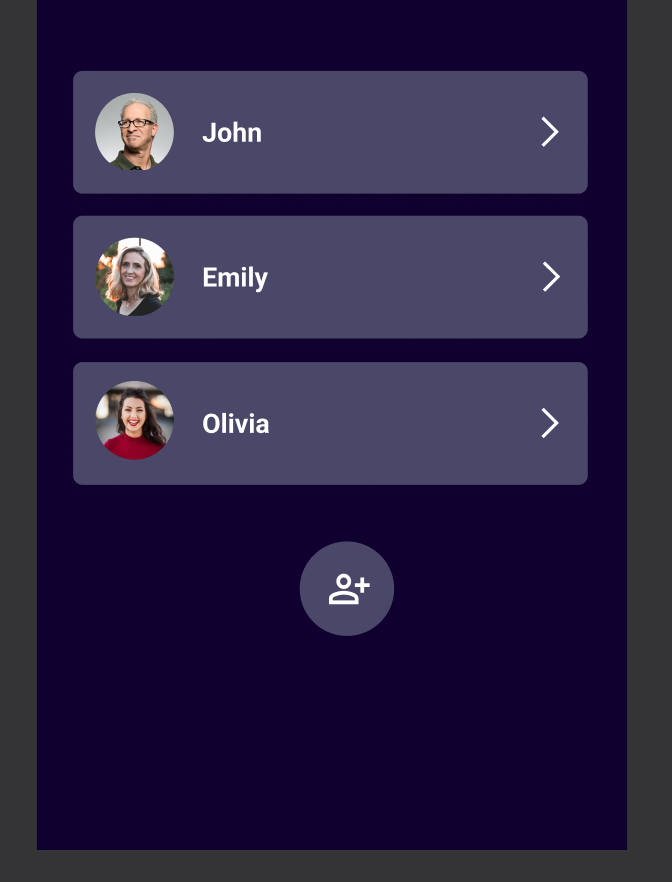
I think it's worth mentioning that since we are developing an MVP, we don't have the user login binded to Firebase or any other authoring tool.  We are using just a user selection screen which then returns a local userID variable (see screenshot below). 

So the flow is like this:

  1. [User Selection] User selects one of the users (e.g. John --> userID = "123"
  2. [Home] Now we land on John's home page which shows John's avatar at the top (based on userID = "123")
  3. [Activities] Then we click on the menu tabs to switch to Activities. John's avatar disappears. The activities tab should show John's activities only, but since the userID is not passed it shows empty.
  4. [History] Same here.
  5. [Settings] Same here.

Is there a way I can overwrite the ${user.id} variable, with my local variable so I can fetch it in the other screens as well?

I have the feeling that the disconnect is happening because of the menu tabs navigation since Users and Home are connected directly in the prototype, but to reach "Activities" I am using the link from the menu tabs, so the data may not be being passed on to that screen?

image.png

Diego Iglesias Bravo team October 30, 2023

Thanks for clarifying! You can't actually store "local" variables like that. My recommendation is to set up a backend with basic requests to collect user data. This way, you'll have actual variables to use and pass to the screens. You can do that with Airtable pretty easilly.

So for example, you can have a table with users, one request to list them and another to get the data from one user. That way you have a user id variable. Note these ids will be different from ${user.id}, which is a global variable only available when the app has authentication.

Wrote something in this thread and want it removed? Request removal

Still stuck?

Ask the community on Discord

This archive is read-only. New questions, office hours and product updates now happen in the Bravo Discord.

Join the Discord