← Data, API & Backend
Data, API & Backend August 13, 2022 · 13 replies

Search fields that are not displayed

Archived from the Bravo community forum (2021–2026). Some answers may refer to older versions of Bravo.

Hello 👋,

I'd like to search elements in a list, but It only works for the fields that are displayed.

Even if the field I want to search is in the selected data, the search component won't return results.

Does someone have an idea on how to do it ?

13 replies
Marta Serrano Bravo team August 16, 2022

Hello  !
There is this video from App monster that maybe could help you:
Let us know!

Bastos August 16, 2022

No I already looked at all the tutorials on the channel. Can't make it work 😟

Marta Serrano Bravo team August 16, 2022

Is there some specific step you are having issues?  maybe could clarify the step you are missing to see if is possible with your use case

Bastos August 18, 2022

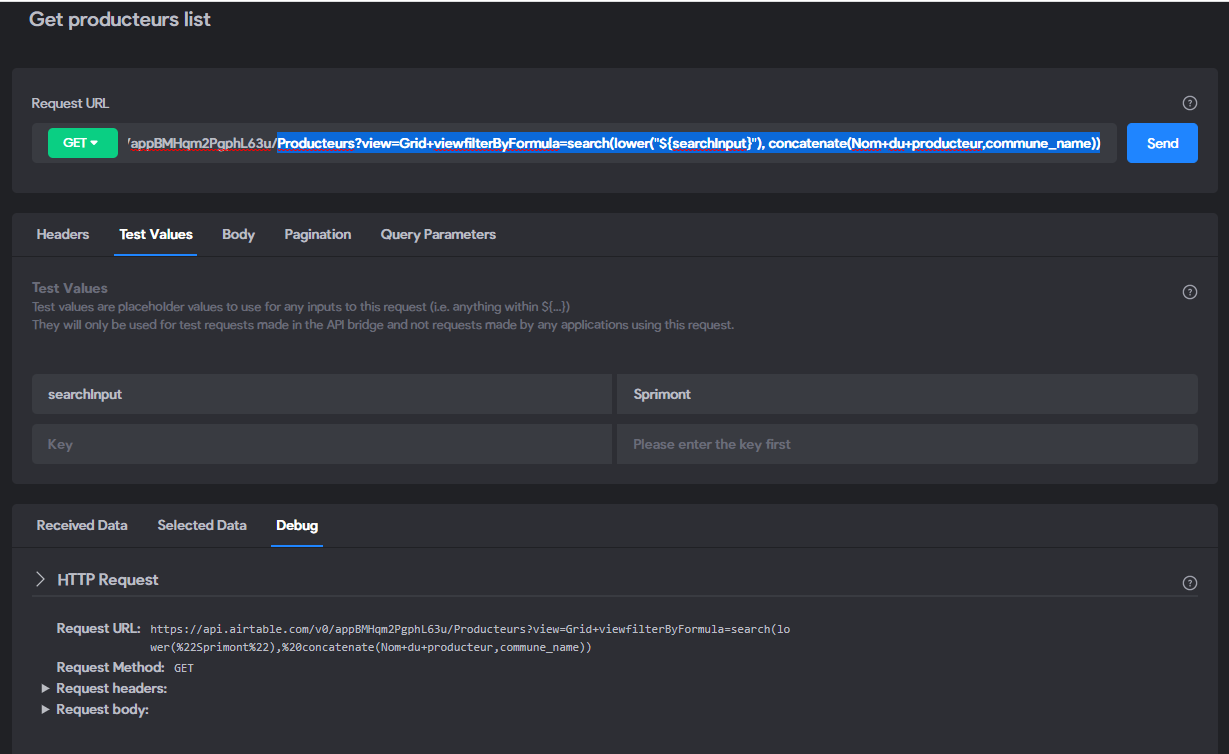
Here it is

I don't get what's wrong. I also tried with fields with no spaces..

image.png

app.monster August 18, 2022

Is the name of the field really with +? Or did you choose a good camelcase name

Bastos August 18, 2022

in Airtable it’s « Nom du producteur »

app.monster August 19, 2022

It's always a bad idea to have special characters in relevant strings (including spaces) try it the way I explained, that could be the reason for it failing. + is definitely an unexpected character for Airtable (which you would also see if you used the Airtable request builder that I share in my videos

Bastos August 19, 2022

I already read and watch every single piece of documentation Bravo created.
I don’t use Xano and the tutorials didn’t lead to a functioning request so..

Wrote something in this thread and want it removed? Request removal

Still stuck?

Ask the community on Discord

This archive is read-only. New questions, office hours and product updates now happen in the Bravo Discord.

Join the Discord