← Data, API & Backend
Data, API & Backend October 5, 2022 · 3 replies

Help please! Dynamic form

Archived from the Bravo community forum (2021–2026). Some answers may refer to older versions of Bravo.

I have a form with a field that I was hoping to have dynamically filled with a list item selected by the user on a secondary/related view.
I looked into how variables work in Bravo, but could not find a way to save a list item to a variable (as a value) and then use it to fill out a form field.
I would really appreciate it if someone here could confirm whether this type of functionality is possible or not in Bravo.
I've added a screenshot of the Figma prototype section and comments for clarity.

Thank you in advance.
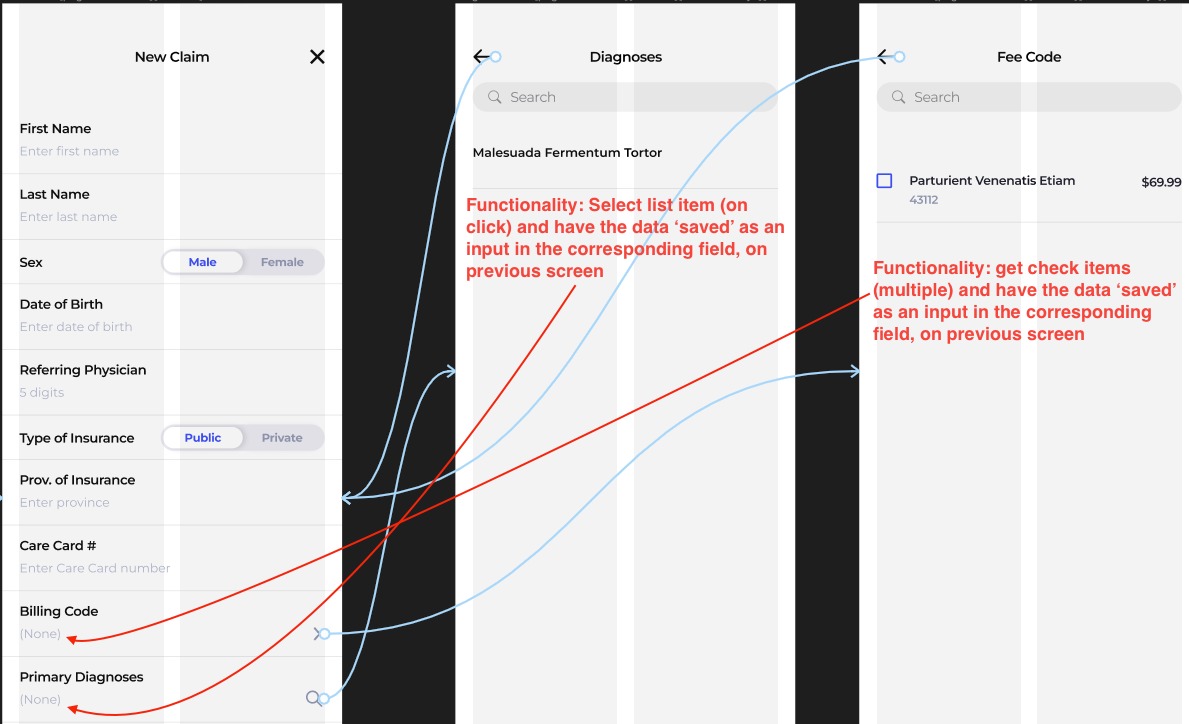
Screen Shot 2022-10-05 at 3.35.53 PM.png

3 replies

Javier Felipe Bravo team October 10, 2022

Hi  

This is an interesting use case! There's no "direct" way to pass the data the user selects in those lists to the form inputs, and we don't have any tutorials about how to implement this case. However, you could try the following:

  • Have a "User Settings" table in your database, where each row stores the information one user selects. These rows should probably be empty in the beginning, when the user hasn't submitted any data yet.
  • In those lists where the user selects data, create remote actions to send this data and store it in the corresponding field.
  • Add a refresh action to the screen with all the settings, so the new data is displayed every time the user selects data.

Wrote something in this thread and want it removed? Request removal

Still stuck?

Ask the community on Discord

This archive is read-only. New questions, office hours and product updates now happen in the Bravo Discord.

Join the Discord