Archived from the Bravo community forum (2021–2026). Some answers may refer to older versions of Bravo.
Android users are experiencing quite slow and glitching performance in addition to frequently receiving error 408, where they need to reopen the app several times.
Scrolling and pagination performance are not satisfying at all.
Anyone experiencing the same issues on their Android apps?
Feel free to try mine and let me know:
https://onelink.to/7s635
Any feedback would be more than appreciated.
Regards
Nour
19 replies
, I had a perfectly working app yesterday on IOS. Today my menu that been prototyped and working for the past 5 months stopped working.
May 24th. Figma released a new state management feature for prototyping. Are you experiencing glitching issues when navigating between screens?
Thanks for your reply! I am talking specifically about Android users. All performance issues are affecting the Android version of the app not the ios. This performance have been like this for quite long time, and I did not really think about it as a high priority since the user base and activity were small, but now I am having continous user activity and all android users are complaining. Worth to mention is that I raised the 408 error several times before but unfortunately I am not receiving any answers.
Hi , could you please add a video here or send it to support@bravostudio.app with the performance issues you are mentioning? Apart from that, 408 errors are not device-related: they are "request timeout" errors, so it must be something with your backend
I have already sent to support two days ago and no reply yet. Concerning 408, I can confirm that it is not the backened, all requests come with status 200. It is the frontend.
error 408 when refreshing
pagination, scrolling and glitching issues
Please note that backened returns all requests green with 200. The longest requests take around 3sec, rest are in millisconds.
you can download and check the app. Download link is in the original post above.
your requests take too long to complete. There's a timeout limit of 3 seconds and that's why you get 408 errors. Regarding the pagination, it's the same issue. Your request to get the next page takes too long, and that's why the loading appears until the request finishes, or it times out. I'll see what can be done in these situations so that we don't show the custom error page when refreshing, but I'm afraid there's not much else we can do if the request is that slow
I am afraid your conclusion is not accurate. This is happening only on Android devices. I am not experiencing these issues on IOS. So if this is happening due to long requests - which is not the case by the way, you can see the screenshots- I should see the same behaviour on both IOS and Android.
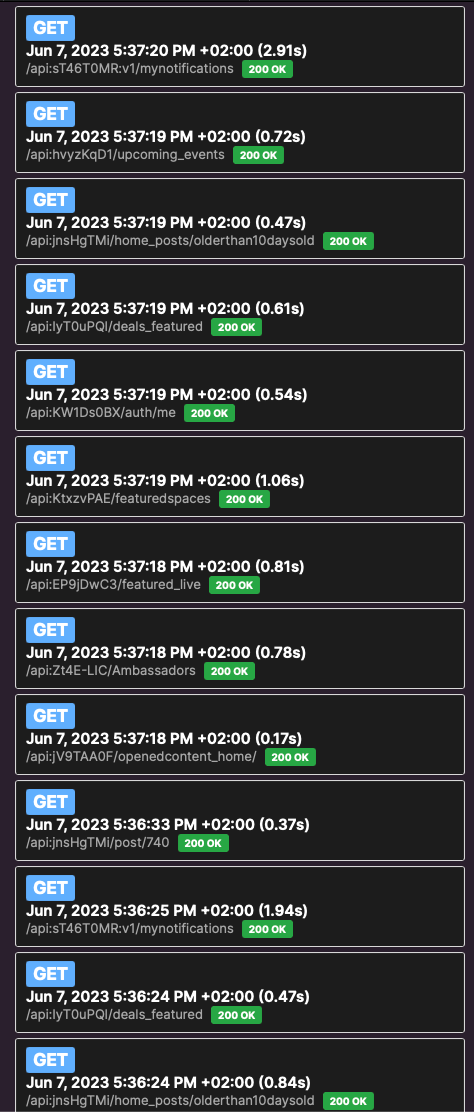
And again, scrolling and pagination issues are on Android devices only.
Could you please send me your Bravo project URL? I will investigate in case there's any issue
I just tested on iOS and as I said earlier, it is not a problem of the platform: you can see in the video that it takes a long time to open your home page, and to refresh that same page. Actually I got 408 errors as well in my first tests with the iOS simulator. Your request takes between 7 and 12 seconds to complete, sometimes even longer. I've taken a look at your app, and in your home screen, you have 9 different requests, so that's the main problem. My recommendation is to try to unify your calls in one, if possible, since you have control of the data you are using. You should notice how everything goes way faster. Another option is to try to split your designs in several pages, since it's not a good approach to show too many data in the same screen anyway.
▶ Video: Simulator Screen Recording - iPhone 14 Pro - 2023-06-08 at 11.29.18.mp4
You are testing on ios while I made it clear several times that the scrolling, pagination and glitching performance is happening on android! Could you please test on an android device to see what I am pointing at since 4 days now?
I had to test in iOS because you told me in this thread, as well as my colleagues in support, that the problem was only on Android and was not happening on iOS. Once I confirmed that the problem happens in both platforms, I explained what the issue was in my previous message: your home page is using 9 different requests in the same page. My recommendation is to try to unify your calls in one call, if possible, since you have control of the data you are using. You should notice how everything goes way faster. Another option is to try to split your designs in several pages, so that there's not that many requests in the same page.
As already tried to explain, the issue is not specific to the platform but due to the page architecture used and this is affecting the whole page performance: to fulfill all data required and render your page, all the requests needs to be processed correctly, if 1 gives an error or experiment any slowness issue the whole page returns in an error.
Also, bear in mind that even if requests are executed in parallel whenever possible, the whole page performance is affected and also because you will have more points of failure.
So, short answer "Multiple requests" is a great feature but is good practice and common sense to use secondary requests only when is not possible to unify them (eg. having requests from different api servers, or if one request returns paginated data).
the problem does not happen in both platforms. You are still insisting on testing on an IOS device while I am saying that glitching, terrible scrolling and bad pagination is happening only on Android. I did record the screen on android device as u requested before and here I am attaching another screen record from my iphone, maybe that would encourage you to test on an android device to see the huge difference. If not, then at least now u have my two recordings for your reference and to other users to compare.
I do not really know on what basis you are claiming that the requests are "that slow" if I did already send you screen shots from your testing requests and all of them take below 3 seconds! Check the attached screenshots again please.
Wrote something in this thread and want it removed? Request removal
Ask the community on Discord
This archive is read-only. New questions, office hours and product updates now happen in the Bravo Discord.
Join the Discord