← Data, API & Backend
Data, API & Backend Solved April 23, 2024 · 2 replies

Struggle with binding

Archived from the Bravo community forum (2021–2026). Some answers may refer to older versions of Bravo.
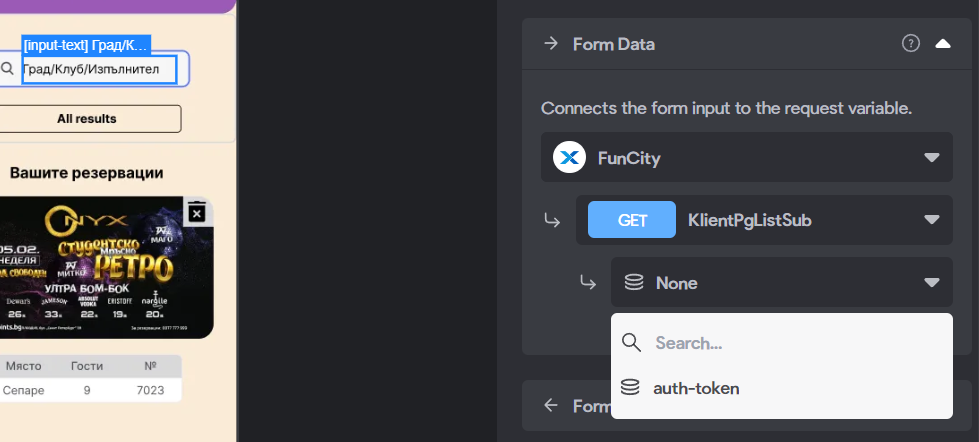
Hello! I’m having trouble with the bind of search[input-text]. The API works perfect but in the dropdown menu is missing the API’s search. How can I fix this issue?

2 replies

Marielle Ibias Bravo team April 24, 2024

Hey @Bozhidar Gushev,

As I understand you’re trying to set up the search backend advanced functionality with Xano.

The data available for binding are the data Selected which are renamed in the “Output variables” section of the API request. I’d suggest double checking the data available.

As per screenshot, if you’re using Xano, you should set up a POST request instead of a GET in the Form Data field.

First step should be following: Search in Xano: https://docs.xano.com/working-with-data/search

You may adjust the following guides: https://docs.bravostudio.app/get-started/help-and-tutorials/browse-by-app-feature/backend-search

Another option is setting up the Search & Filter functionality with tags: https://docs.bravostudio.app/bravo-tags/mobile-actions/component-search-and-filter
This is recommended for small lists and will search data from the same screen.

Hope it helps, let me know if you have further questions.

Bozhidar April 25, 2024

Thank you @Marielle Ibias for the fast reply! It’s working

Wrote something in this thread and want it removed? Request removal

Still stuck?

Ask the community on Discord

This archive is read-only. New questions, office hours and product updates now happen in the Bravo Discord.

Join the Discord