← Data, API & Backend
Data, API & Backend December 29, 2023 · 4 replies

Urgent Assistance Needed: Integration Challenges with Bravo Studio and Airtable

Archived from the Bravo community forum (2021–2026). Some answers may refer to older versions of Bravo.

I hope this message finds you well. I am a graduate student working on a time-sensitive project that involves creating an app using Figma, Bravo Studio, and Airtable. I've successfully designed the interface in Figma, transferred it to Bravo Studio, and set up the API on Airtable. However, I am currently facing critical integration challenges and would greatly appreciate your insights and assistance.

The main issues I'm encountering are:

1. Get Request for Details: I've successfully implemented the get request for a list, but I'm struggling to make it work for details in Bravo Studio. When attempting to retrieve detailed information for a selected item, it consistently displays all items from the database rather than the specific details of the chosen one.

2. Post Request: Despite ensuring the correctness of the bearer token, the post request consistently fails. This is a crucial aspect of the app's functionality, and I need a quick resolution as my deadline is approaching

I am reaching out to this community in the hope that your collective expertise can help me overcome these challenges. If you have any insights or suggestions, or if you've encountered similar issues, I would be immensely grateful for your guidance.

Given the urgency of my situation, any prompt assistance or direction to relevant resources would be highly appreciated. Please let me know if there is a convenient time for you to connect or if you prefer alternative communication methods.

Thank you all for considering my request.

4 replies
Stéphan December 30, 2023

Hello Shatha !

Using the GET List request requires a record, which can be unique for profiles or set to "All" for a given list. If you opt for "All," ensure there's a record before syncing data from Figma to Airtable through Bravo Studio.

For the GET details request, no record is needed; elements should be directly synchronized.

As you can observe in Airtable, rows represent lists (row 1, row 2, etc.), and columns represent details.

Regarding the POST request, could you provide the error message displayed?

To assist you step by step, please send screenshots of the GET LIST & DETAIL synchronizations and any other relevant details for us to address.

In my previous posts, I demonstrated how to perform list and detail synchronizations using Bravo Studio, including detailed screenshots. If you could refer to those posts and provide additional information or clarify any specific issues you're facing in those steps, it would greatly assist in addressing the challenges you're encountering.

shatha December 30, 2023

Hello Stéphan,

Thank you for your quick response and guidance. I've revisited the synchronization settings in Bravo Studio for both GET List and GET Details requests, and it appears that the GET List is working correctly. However, the GET Details request seems to behave as a GET List request instead.

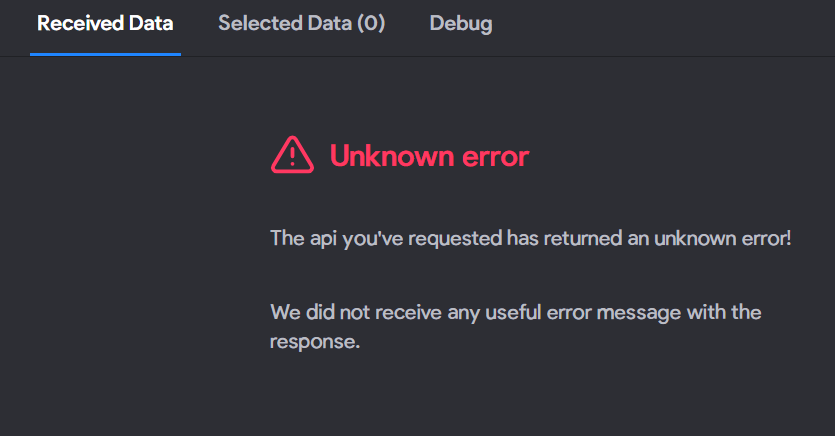
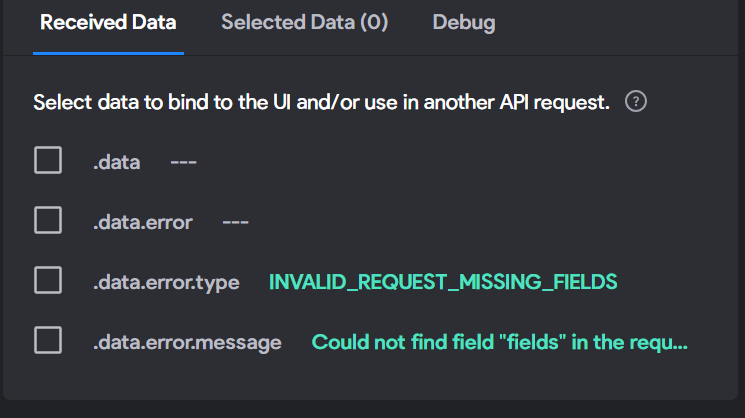
For the POST request, I initially encountered an authentication issue, which I resolved by correctly providing the bearer token. However, upon further attempts, I faced a new challenge where it states "invalid request missing fields." I tried to address this by manually entering the JSON code with the required fields enclosed in ${}, but now I'm encountering an "unknown error."

In light of this, I'm considering the possibility that there might be something amiss from Airtable's end. Are there specific considerations or configurations in Airtable that might affect the behavior of GET Details or POST requests? I want to ensure that I've covered all bases and ruled out any issues from the Airtable side.

I've also tested the POST request using Postman, and it consistently returns an "invalid request" error. It seems like I might be missing something crucial in the configuration or structure of the data.

To facilitate a more detailed discussion, I'll compile screenshots of the GET LIST & DETAIL synchronizations and share them with you shortly. I hope these visuals will provide a clearer understanding of the challenges I'm facing.

Stéphan December 30, 2023

@shatha Of course, I will provide you with a similar example including screenshots and synchronization configurations for easier observation. I will create a table on Airtable for the example, along with three Figma screens representing GET LIST, GET DETAILS, and POST operations. To create the form, I need to see the one you're using on Airtable and Figma. Ensure you avoid spaces and accents in Airtable for your form fields.

shatha December 30, 2023

@Stéphan N'GUISSAN I deeply appreciate your swift response and the willingness to provide a similar example. Your hands-on approach is incredibly valuable, and I'm truly grateful for your assistance.

To assist you better, I'll provide you with the necessary details:

  1. Airtable Form:

    • I'll share the specific details and configurations of the form I'm using on Airtable. I'll make sure to avoid spaces and accents in the form fields, as per your recommendation.
  2. Figma Screens:

Your generous help means a lot to me, and I sincerely appreciate your kindness. May God bless you with many good deeds.

Wrote something in this thread and want it removed? Request removal

Still stuck?

Ask the community on Discord

This archive is read-only. New questions, office hours and product updates now happen in the Bravo Discord.

Join the Discord