← Data, API & Backend
Data, API & Backend December 31, 2022 · 9 replies

user.id for user specific data

Archived from the Bravo community forum (2021–2026). Some answers may refer to older versions of Bravo.

Hi. Does anyone know whether its possible to store data combined to a user.id? My App users post something and the userid works fine,  however I would love to have their names bind to the userid in Airtable so that I can sort by names. Have already tried to change the UUID in Firebase but that doesn't work. Any ideas?
thx

9 replies
Valter December 31, 2022

Yes its possoble. Foŕ that you need to have post-login-page. After just use some logic on airtable with lookup fields. Work 100% on my app.

Silas January 2, 2023

Thank you so much, will try that out for sure!
Seems like I never really understood the way you can use the lookup fields in Airtable until right know.
Thx 😃

Silas January 3, 2023

Would you mind sharing the logic that you used? I've tried update record but cannot get it to work (don't know how to connect the userid to the name). If you don't want to do it publicly in the forum I would appreciate you sending me an email at [email removed].
Thank you in advance!

Silas January 5, 2023

Hi. Already made that work for my use case. However in my example my users wouldn't have a post login page, since at least for now I plan to add users by myself (and with that I will also add their data by myself). So i would need a way I could use Airtable logic so that every time a new record enters the base it automatically connects to the name associated with the user.id. Do you know a way to do this? Sadly in the Airtable Forum I didn't receive an answer for a week now. Thx in advance!

Silas January 5, 2023

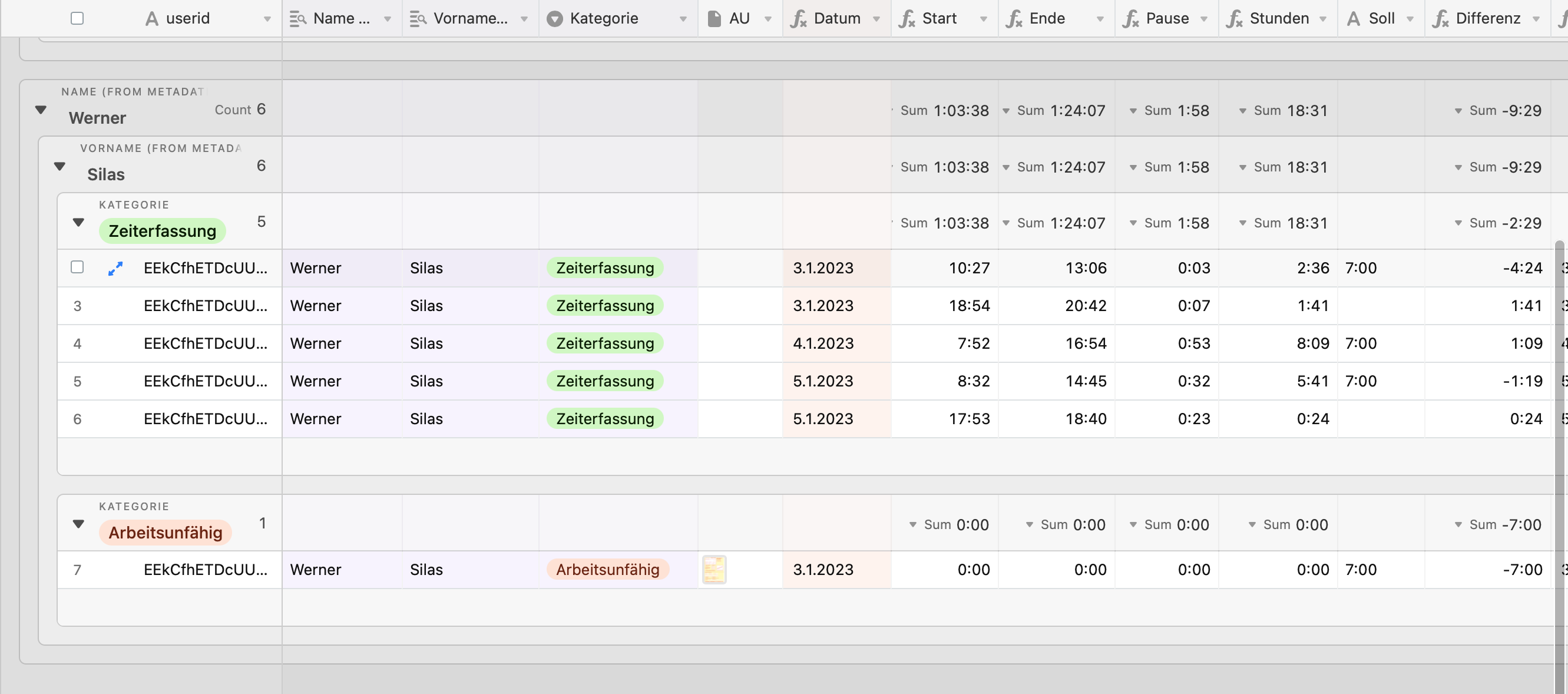
This is the Airtable for my App. The userid is automatically generate once a new record is created since it is connected to the Account of the user. This also works the other way round (GET request). Problem is the automation of getting the first name and surname automatically because of the specific userid. Thx for any tips.

Bildschirmfoto 2023-01-05 um 21.24.12.png

Silas January 11, 2023

Hi. My question still stands. How can I connect my user data to the user id provided by Firebase. The rest of the Data Base works fine and I get along with "easier" automations. However which automation should I use? I am guessing "when a record enters the view" and then "user id to when not empty" however does anybody have an idea on how I should go on? Thx

Silas January 19, 2023

Yes, thanks. However I don't think that that solves my problem. In my app the users currently don't have the ability to input their names by themselves since I don't use a post log-in page. So I would need Bravo to send the usernames in the backend just like it does with the ${user.id}. If that is not possible I would need an automation in Airtable to bind an incoming record that only has a user.id but no name to a specific name that is already stored in the database. Is there any way I could do that? Thx.

Wrote something in this thread and want it removed? Request removal

Still stuck?

Ask the community on Discord

This archive is read-only. New questions, office hours and product updates now happen in the Bravo Discord.

Join the Discord