← Data, API & Backend
Data, API & Backend July 4, 2024 · 4 replies

Vertical scrolling when using Slider

Archived from the Bravo community forum (2021–2026). Some answers may refer to older versions of Bravo.

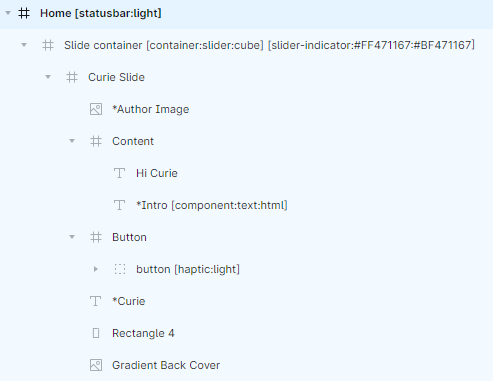
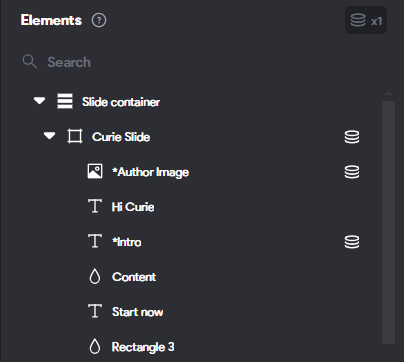
Hello, I am using a slider and its connected to an external API. The issue is I am able to see vertical scroll with multiple repeating data items. Not sure why the vertical scroll is coming. I check the figma file and it seems fine to me. I have also made sure that I connect the data array to the individual slide element, rather than the slider container. Please help!

4 replies

Marielle Ibias Bravo team July 4, 2024

Hi @Debasish Gracias, are you trying to set up the horitzontal slider? In this case, make sure to bind it to bind the list to the container which contains the image and not to the frame that has the [container:slider:horitzontal] tag. Then, bind the url to the image.

Debasish July 4, 2024

@Marielle Ibias Yes I am trying to set up the horizontal slider. I’m
pretty sure I have done it properly as can be seen in the screenshot below

Can you please point what I am doing wrong?

Marielle Ibias Bravo team July 5, 2024

Hey @Debasish Gracias, please make sure that the slider container is smaller than the top level frame in order to slide.

Debasish July 5, 2024

@Marielle Ibias Yes I tried making it smaller but same issue. So the issue is vertical scroll. I am able to see the horizontal scroll(thats not the issue). So I need your help to remove the vertical that I am able to see in my Bravo Vision Android app. Please let me know if it makes sense. I have sent you my figma and bravo app file links.

Wrote something in this thread and want it removed? Request removal

Still stuck?

Ask the community on Discord

This archive is read-only. New questions, office hours and product updates now happen in the Bravo Discord.

Join the Discord