← Data, API & Backend
Data, API & Backend January 4, 2024 · 13 replies

Won't let me upload photo from Gallery but will work from camera

Archived from the Bravo community forum (2021–2026). Some answers may refer to older versions of Bravo.

Hi,

I’m very new to this so please excuse any basic knowledge I’m missing but I’ve got my app to a stage where I can upload photos as part of a form.

When I try to upload a photo to the form from a gallery (camera roll) I get a:

422

Status code 500 error

It uploads the photos (I think) and I can see the spinning wheel. But when I submit I get the error.

  • Photos from the camera work absolutely fine. Upload and submit with no issues

  • The photos I am trying to add are taken on the same phone so it’s not like they are 40mp pics.

  • Testing on bravo vision on and iPhone 12

  • Using Xano as backend

  • I have a conditional in Xano so that if the photo input is empty it will add a default image. The issue was before I added this though so I don’t think it’s relevant.

Any help is greatly appreciated.

Sammy

13 replies
Marielle Ibias Bravo team January 8, 2024

Hi @Sammy Purcell,

Status code 500 error means that the API you've requested has encountered some kind of internal error. There might be something misconfigured in Xano.

I’d suggest debugging and checking your API requests history in Xano.

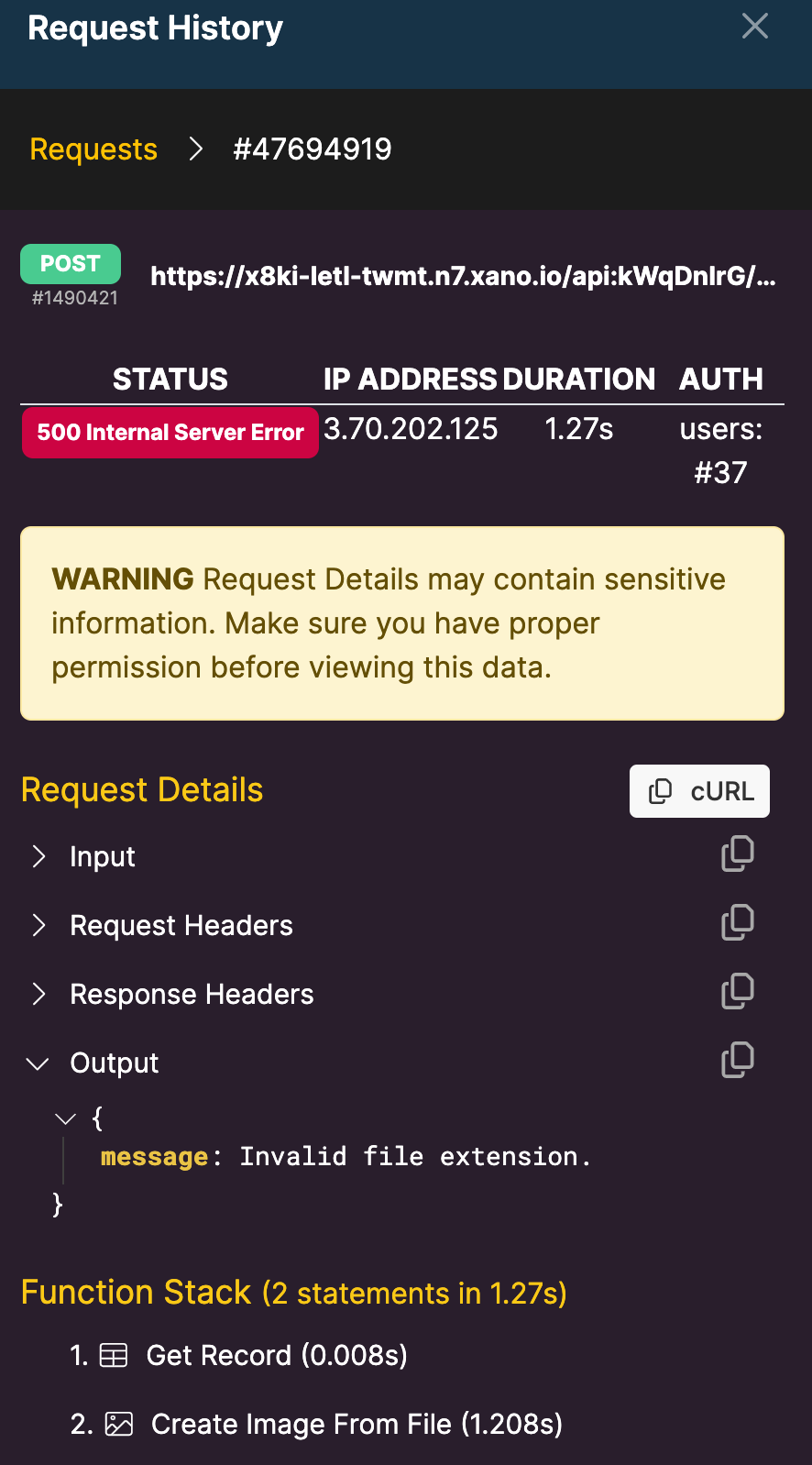
Can you share us a screenshot of the request from Xano?

👉 Errors in API requests

Sammy January 12, 2024

Thanks so much. I will have a look and this and see how I get on

Sammy January 23, 2024

When following the image_url that bravo creates the only difference is one will open in chrome and the other downloads the file straight away.

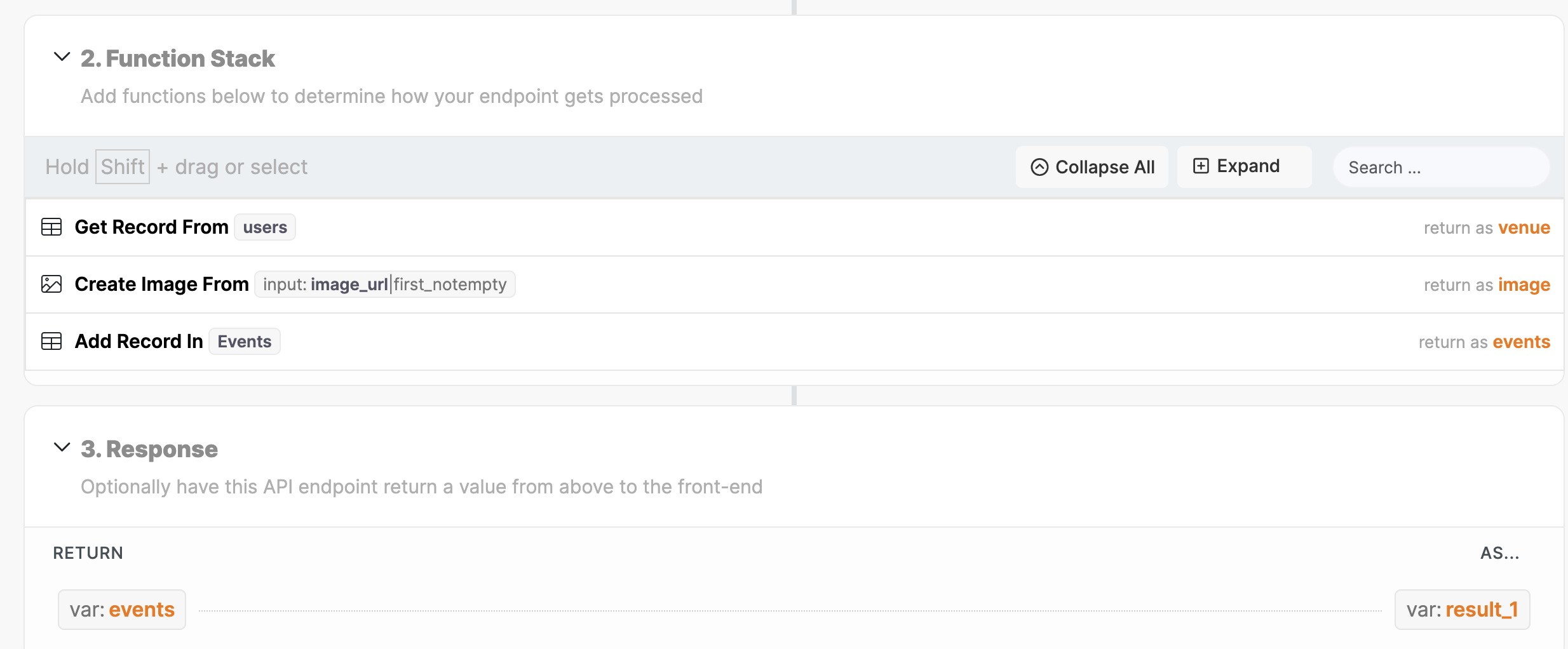
Here are the results and function stack:

Sammy January 23, 2024

I’ve compared both URLs and there is no file extension in either of them

Sammy January 23, 2024

@Marielle Ibias Thanks. Have replied below with screenshots.

Marielle Ibias Bravo team January 24, 2024

@Sammy Purcell can you please share more details of what to you aim here?

Is this request for an Edit Profile page? If you’re editing data of an existing id, its more proper to use a PATCH request.

When the user gets to the page, are you gonna be showing the default picture? Or the user will only see the default image if they skip adding a photo.

Sammy January 24, 2024

It’s for both edit user and add/edit record (event).

I’m using patch for the edit and post for the add events.

Sammy January 24, 2024

Just tried uploading the image as a file upload directly rather than image URL and the same issue occurs

Sammy January 25, 2024

@Marielle Ibias I will go through it again now. I’m sure I’m missing something obvious.

Thanks

Sammy January 28, 2024

Hey, I’m still having issues with this. Any ideas how I can troubleshoot it? Thanks so much

Sammy January 30, 2024

Okay, my latest guess is it’s something to do with the file size. If I upload a photo from gallery that was taken on my iPhone and (digital) zoomed in a lot when it was taken (therefore smaller file size and resolution) it will upload no problem.

If I try to upload a photo taken from the phone with no zoom therefore full res. It still fails.

Any ideas on how to trouble shoot this would be welcome.

Wrote something in this thread and want it removed? Request removal

Still stuck?

Ask the community on Discord

This archive is read-only. New questions, office hours and product updates now happen in the Bravo Discord.

Join the Discord