← Data, API & Backend
Data, API & Backend July 28, 2022 · 9 replies

Xano Oauth not working.

Archived from the Bravo community forum (2021–2026). Some answers may refer to older versions of Bravo.

I've been following precisely the guide on how to setup custom backend on Bravo step by step and I've also watched some video tutorials on the topic.
Still there are certain aspects not covered enough and I'm not able to login through my app.
I'll go through each aspect of the Login-authentication, so you can check with me if it was done properly

-1 **API collection settings
**Under the collection settings, I selected Bearer token and then I didn't write down any Bearer token

-2 Integrations 

  1. I enabled custom login 
  2. I selected Xano  
  3. I selected an endpoint collection and I have chosen the ME endpoint, that is the endpoint that Xano autogenerates to retrieve info about the authenticated user 
  4. I have changed the data name accordingly to how it was required
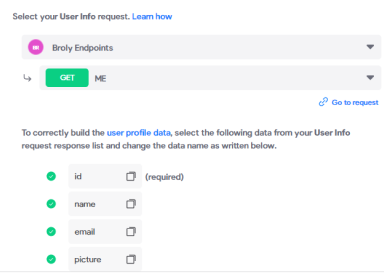
 

image 1 (1).png

-3 Login API request 

  1. have added some test values to the request and I have verified that it works


-4 Data binding 

  1. connected email and password fields so that input is added to the fields ${email} and ${password} of the request 
  2. The sign-in button is not bonded to any API collection, on Figma the element is tagged [action:login] 
  3. I have selected as "set access token" if the action is on success


+++Right now I get error 500++

**Additional very strange things happening
**
I have an endpoint PUT-user that modifies user details, it is an authenticated method and:
it works as long as I keep on the collection settings (under section Authentication)  "none" field selected. As I select Bearer token it stops working.
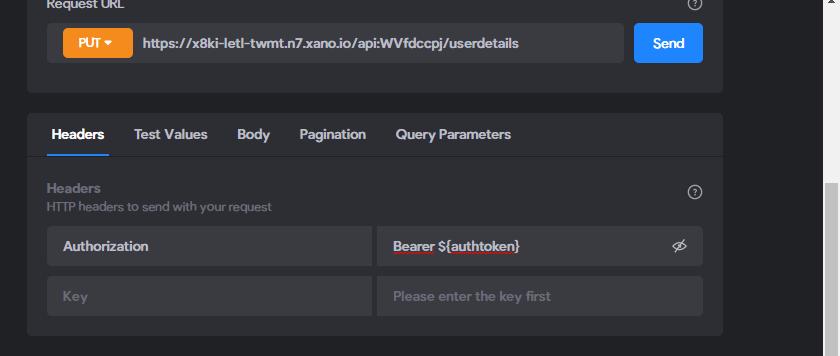
image 1.png

If you have any idea on what I could do, even if you are not sure, please let me know, at this point I don't know what else to do!

9 replies

John July 28, 2022

Hi Fred, my comment may sound too honest but, my point is if you are not a software engineer, what are you even trying to achieve? 
Clearly you shound't have placed "Bearer" in front of the authtoken variable because you already defined on the collection settings that the Oauth is through Bearer. 

Cya

Javier Felipe Bravo team July 29, 2022

Hi ! In order to fix this, I'd recommend going over the custom login guide again and making sure you're setting up all the areas as indicated there - custom login setup comprises several steps that need to be followed thoroughly, otherwise you'll experience issues. Is your login request working correctly from the API collection?

Also, you mentioned you followed a video tutorial, this was probably not custom login-related (since the only guide we have regarding the topic is in written format).

Fred July 29, 2022

Hi Javier, I tried it again and I've noticed that it is still not working as it should.
I have already followed the instructions of that written guide and I've listed all the steps I took. 
As I already wrote the Signin request works correctly testing it from the endpoints collection. 
Signin is successful as long as I set as Action on the action button to open another screen, if I select "generate token" instead it gives me error 422, unable to fetch info.

Ajay August 1, 2022

Maybe he is trying to use a 'No-Code' Builder to try and create something he wants. Don't be a dick dude. Seriously. Help or get lost.

Fred August 1, 2022

Hi Javier, I've sent the material but they didn't reply anything concerning my Login issue and Databinding, what can I do now?

Javier Felipe Bravo team August 1, 2022

Hi , our support team has received the enquiry and will get back to you as soon as possible. :)

Wrote something in this thread and want it removed? Request removal

Still stuck?

Ask the community on Discord

This archive is read-only. New questions, office hours and product updates now happen in the Bravo Discord.

Join the Discord