← Publishing
Publishing Solved March 5, 2024 · 7 replies

APP taken down: Google Requires Prominent Disclosure

Archived from the Bravo community forum (2021–2026). Some answers may refer to older versions of Bravo.

Hi community,

My app called “mOAtion” was approved in December but in a recent review Google has found out that:

During review, we found that your app violates the Malware and User Data policy. We detected that your app currently contains spyware code that transmits personal data off the device without adequate notice or consent.

Issue with your app:

Your app is uploading users' Image information but the privacy policy and the prominent disclosure do not meet the policy requirements.

  • The privacy policy in the designated field in the Play Console is inadequate because

    • it does not disclose the collection of Image information.

    • it does not disclose the usage of collected Image information.

  • Your app does not have a prominent disclosure.

My app is simple and does not collect any user’s image, at least on purpose. Maybe there is some process in the background from the bravostudio framework or any other SDK that collects and uploads this information. So they want me to put a prominent disclosure in my app to ask my users for consent.

I appealed and it was rejected.

I contacted bravo studio team. Following their instructions changed a couple of things in the policy, made a new build, and submitted a new version for the closed testing track leaving production unchanged. I wanted to “test the waters” first on the closed testing track.

The update was rejected as well. They still claim:

Your app is not compliant with the User Data policy.

  • Your app is uploading users' Image information without a prominent disclosure.

Your app is not compliant with the User Data policy. Specifically,

  • Your app is uploading users' Image information without posting an adequate privacy policy in the designated field in Play Developer Console.

  • Privacy Policy in the designated field in Play Developer Console does not disclose the collection of Image.

  • Privacy Policy in the designated field in Play Developer Console does not disclose the usage of collected Image.

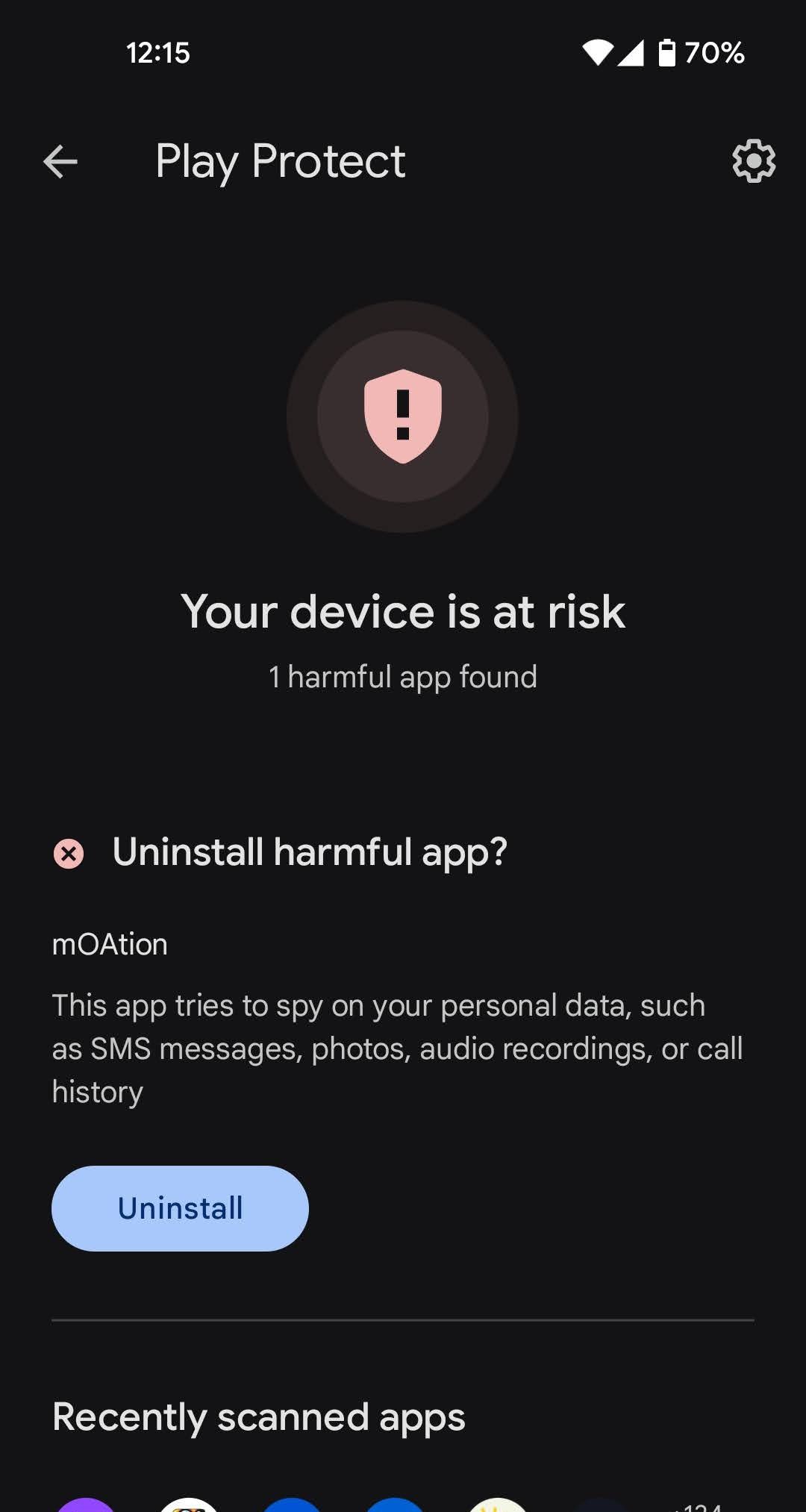
My users are getting notification warnings from Google Store Protect telling them to uninstall the app (see attachment) as if it were spyware.

I couldn’t find any other post from somebody in a similar situation.

Can somebody please help? I don’t want to spam Google with new builds without having a proper solution.

BTW, the same app on the Apple Store has no issues.
7 replies

Alberto Manzano Bravo team March 5, 2024

Hi @Jose, this is a “false positive” that still don’t understand how Google triggers it. It is solved by filling correctly the Data Safety section, as mentioned here: https://docs.bravostudio.app/app-publication/publishing-your-app/android-publication-complete-process/google-play-publication#id-2.10.-data-safety. Also, make sure you have a privacy policy and fill the Advertising ID section as well: https://docs.bravostudio.app/app-publication/publishing-your-app/android-publication-complete-process/google-play-publication#id-2.12.-a-dvertising-id

Alberto Manzano Bravo team March 5, 2024

After that, don’t forget to send your changes for review. If you still have problems, please do let me know

Jose March 5, 2024

Thank you for your reply.

This is what the bravo team told me. I paid extra attention to these guides and carefully filled them. I will retake a look.

Should I add in my privacy policy that I collect images? (we don’t do that actively) but I also saw that we have the following permissions in the Manifest:

android.permission.CAMERA
android.permission.READ_EXTERNAL_STORAGE
android.permission.READ_MEDIA_AUDIO

Therefore, now in the privacy policy, we added this:

While using Our Application, in order to provide features of Our Application, We may collect, with Your prior permission:

  • Pictures and other information from your Device's camera and photo library

We use this information to provide features of Our Service, to improve and customize Our Service. The information may be uploaded to the Company's servers and/or a Service Provider's server or it may be simply stored on Your device.

Is this correct? Should I remove it?

Another question: Should I submit an update for the production track and testing track simultaneously?

In the appeal response, they highlighted the following sentence:

Before resubmitting your app for further review, please make sure to DEACTIVATE the non-compliant APK (App Bundle Version: 2, Track: Production) and increment the version number of the APK. Kindly note that all active APK versions need to be compliant.

Thanks for your help!

Alberto Manzano Bravo team March 5, 2024

I would submit it to production directly. We will need to contact Google Play to try to understand why they are raising this error, because we don’t collect any user picture or anything similar, at least from Bravo side. Is your app using any webview that has some photo uploading, by any chance?

Jose March 5, 2024

No, the webview we have is just to show our website’s “About” section. There’s no way the user can upload any image.

Let me know if you need any detail from me to contact Google. You could use my app as an example of false positive.

I am making a new build and will submit an update in short. I will post the result.

Jose March 6, 2024

I write to let you know the issue has been solved.

I was releasing the update first only in "closed testing" track.

Then, I did it on the "closed testing" and "production" track.

I was missing the "open testing" track (which was on status "paused").

The problem was then fixed when I released the clean update in all the tracks at the same time, including the paused "open testing" track.

So, in hindsight, reading carefully Google told me to do so in the reply to my appeal.

They wrote:

Before resubmitting your app for further review, please make sure to DEACTIVATE the non-compliant APK (App Bundle Version: 2, Track: Production) and increment the version number of the APK. Kindly note that all active APK versions need to be compliant."

"ALL active APK versions need to be compliant."

I hope this helps if somebody else has the same problem.

Thanks for your help @Alberto Manzano

Alberto Manzano Bravo team March 6, 2024

@Jose, Thanks a lot for the explanation and happy to know the issue has been solved!

Wrote something in this thread and want it removed? Request removal

Still stuck?

Ask the community on Discord

This archive is read-only. New questions, office hours and product updates now happen in the Bravo Discord.

Join the Discord