← Resources & Tips
Resources & Tips Solved January 18, 2024 · 5 replies

How do I set the default tab / menu item in [menu:tabs]

Archived from the Bravo community forum (2021–2026). Some answers may refer to older versions of Bravo.

Apologies if I’ve missed something obvious here. I’ve set up a 3 tab menu for my app: Results, Schedule, and Standings. The active tab when I launch the app is Standings (rightmost tab). How do I set it to Results (leftmost tab)?

Many thanks in advance!

5 replies
Marielle Ibias Bravo team January 18, 2024

Hey @Liam Greig,

Please check this guide: Tabs menu

Let us know if any questions.

Liam January 18, 2024

I’ve reviewed that page a couple of times but it doesn’t address my issue/question. Thanks

Liam January 18, 2024

@Marielle Ibias any further thoughts on this? Seems odd that the default tab is set to the rightmost item… What am I missing here?

Marielle Ibias Bravo team January 19, 2024

Hey @Liam Greig, Apologies I misunderstood.

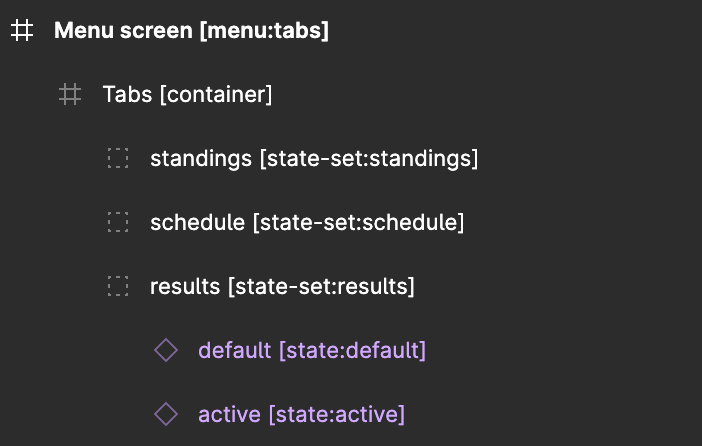
In this case you should reorder the groups under the container frame.
As per your example, the order should be: “Standings”, “Schedule” and “Results”.

In this case, Results will be the first one active. Hope it helps!

Liam January 19, 2024

Thanks @Marielle Ibias managed to get this working. My layers were already in the order you suggested so I actually had to reorder them, sync with Bravo, put them back in the correct order, and sync with Bravo again. A bit of an odd workaround but maybe that helps the next time someone encounters this issue 😊

Thanks for your help with this one

Wrote something in this thread and want it removed? Request removal

Still stuck?

Ask the community on Discord

This archive is read-only. New questions, office hours and product updates now happen in the Bravo Discord.

Join the Discord