← Resources & Tips
Resources & Tips November 21, 2022 · 2 replies

How should I convert a "single select" field from Airtable into a variable on Bravo?😥

Archived from the Bravo community forum (2021–2026). Some answers may refer to older versions of Bravo.

Hi there, I´m trying to connect a form from Airtable to Bravo. Everything was ok until I change the field "category" (see screenshot below). This field is a "single select" on Airtable but is also an input from the user in this form. How should I convert this field into a variable?
Thanks!
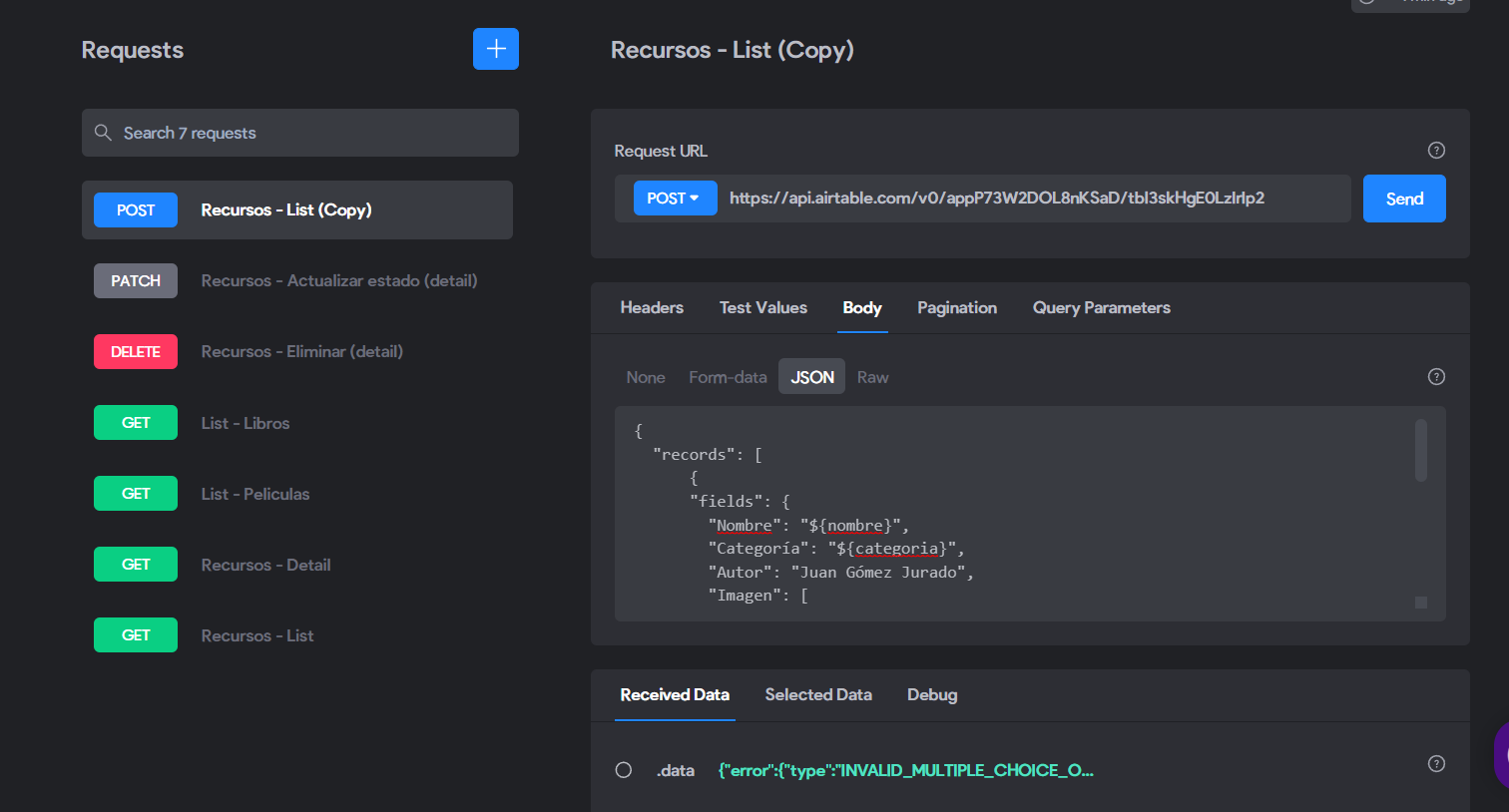
image.png

2 replies

Diego Iglesias Bravo team November 22, 2022

Hey Luz, variable names on the json (POST) must match the variables returned by the api request (GET). In your case, check if the single select parameter is named as ${categoria} on the (GET) api request and it should propagate to the POST one.

ian March 21, 2023

hello,i also have a similar problem,so should i start with the (Get) request first so  i can get variables returned in order for to me to use it on the (POST)?

Wrote something in this thread and want it removed? Request removal

Still stuck?

Ask the community on Discord

This archive is read-only. New questions, office hours and product updates now happen in the Bravo Discord.

Join the Discord