← Publishing
Publishing September 2, 2022 · 11 replies

How to recover the user phone after login ?

Archived from the Bravo community forum (2021–2026). Some answers may refer to older versions of Bravo.

Hi everyone!

I have some questions about the user.phone. First question, why the post:login doesn't work for phone connections? Second question, how to recover the user.phone after login in the same way as the user.email or user.id? 

I want to create a profile page and the user can see his email or phone used at registration

Thanks for your feedback

11 replies
Florian September 2, 2022

Good question, we are at least 2 others in the same situation. Problem hasn't been answered yet.

Bastos September 2, 2022

What I did is an httpbin get request to retrieve the email set in the login page and put it again in the postlogin page

Aymeric September 2, 2022

no problem for the email, it works very well but for the phone ?

Slick September 2, 2022

I've been able to solve the post-login issue for Phone now. But I still don't know how to setup an API for conditional display of the post-login page. 

I also asked the Bravo Team about the variable for phone number like how we have for email but they said that there's no variable for that at the moment.

Slick September 3, 2022

, I apologize, I got caught up in some work.

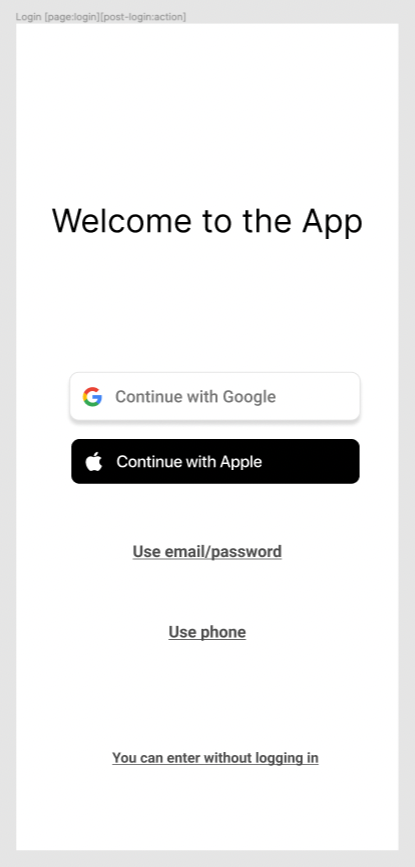
So for post-login to work for Firebase phone login you'll need to have a screen in which you show users options for login methods, even if you have only one login method that you're going for (you can list just that one). On this screen you need to put both the [post-login:action] tag and the [page:login] tag, even if the actual login is on another screen.

Screenshot 2022-09-03 at 10.16.32 AM.png

Then you can setup post-login based on the success or error status codes, but that's where I'm struggling. My Airtable request is sending status code 200 - OK even if the user.id doesn't exist in the table.

As of now to test the post-login screen I've set it to show both in case of success or error and it works fine.

I've been told by the Bravo team that for Airtable it's better to use a tool like Make or Zapier for custom status codes to pull this off but I haven't been able to make that work yet because of the dynamic element which is the $user.id variable. If you guys can figure that out, please let me know. 

Hope this helped and thanks in advance!

Wrote something in this thread and want it removed? Request removal

Still stuck?

Ask the community on Discord

This archive is read-only. New questions, office hours and product updates now happen in the Bravo Discord.

Join the Discord