← Resources & Tips
Resources & Tips July 14, 2022 · 2 replies

Overlapping containers?

Archived from the Bravo community forum (2021–2026). Some answers may refer to older versions of Bravo.

Hi there, I'm very new to Bravo and wanted to know if there's a way to design overlaying containers like the ones on my design? (see image below)... In my design I would like to stack two cards one on top of each other like a wallet (blue card and white card). Is this even possible in Bravo?

Thanks in advance for any insights you can provide.
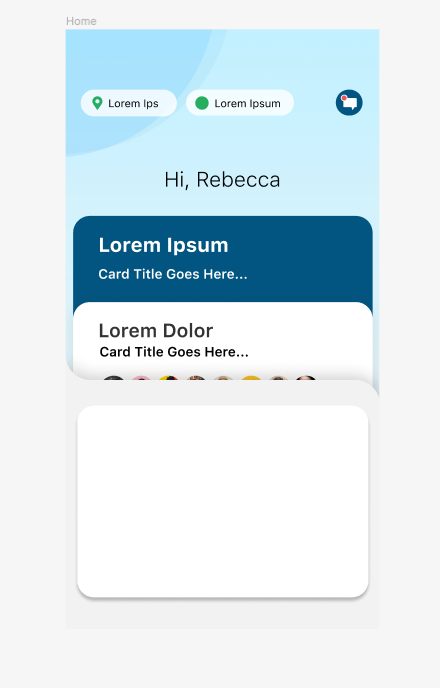
Screen Shot 2022-07-13 at 7.27.33 PM.png

2 replies

Marta Serrano Bravo team July 14, 2022

Hello !
Currently, we do not have any "Card" components with the right animation. At the moment the only thing will be creating the UI you want in Figma and then when the user press in a card, open a page (normal, modal, popup,...).

However, will not be animated. We just allow Layer containers to be over other containers. Have a look if could be something interesting for your case.

I hope it helps you!

app.monster July 14, 2022

It is not possible to have overlapping containers. The whole point of them is to give a clear structure to the design. However, you can achieve this design by having the card designs all in one container or multiple small ones. I don't know if you want them to open or be generated in a list or anything but just seeing your screenshot that would work.

Wrote something in this thread and want it removed? Request removal

Still stuck?

Ask the community on Discord

This archive is read-only. New questions, office hours and product updates now happen in the Bravo Discord.

Join the Discord