Archived from the Bravo community forum (2021–2026). Some answers may refer to older versions of Bravo.
Greetings, Bravo Community!
Are you ready to enhance your app development journey with Static Binding?
Customising and configuring static binding has never been simpler. Here's a concise 5-step guide to help you kickstart the process:
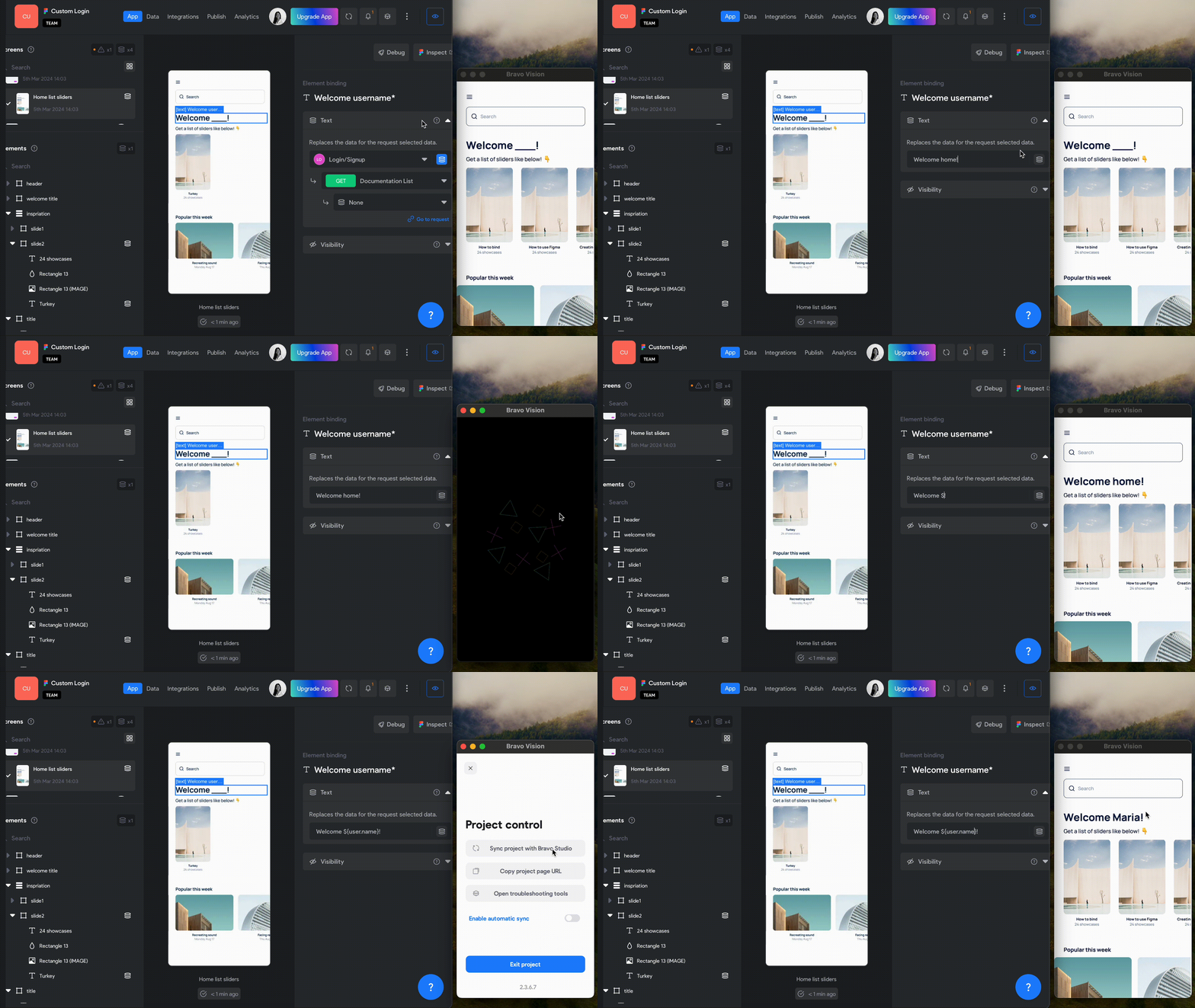
Ensure that there's an API request bound to the corresponding screen.
Select the text element where you intend to apply static data binding.
Activate static binding by toggling the blue button to grey.
Input the desired text along with the variable you wish to use. For instance, input "Welcome ${user.name}" and "Welcome home!" as demonstrated below.
See the changes by syncing your Bravo Vision!🚀
By following these simple steps, you'll be well-prepared to craft engaging and dynamic user experiences with ease.
For further insights, refer to our documentation available:
Static Binding
We trust you'll find this helpful! Do you have any other tricks you'd like to share with us? We're eager to hear from you! 😊
Additionally, remember that our team is here to provide any assistance or professional services you may require for your project. We're committed to supporting you at every stage of your journey! 🚀
Warm regards,
The Bravo Team 🎉
1 reply
Wrote something in this thread and want it removed? Request removal
Ask the community on Discord
This archive is read-only. New questions, office hours and product updates now happen in the Bravo Discord.
Join the Discord