← Resources & Tips
Resources & Tips July 29, 2022 · 1 reply

Tutorial: Create your first app with Bravo

Bravo team

Archived from the Bravo community forum (2021–2026). Some answers may refer to older versions of Bravo.

In this tutorial you will learn how to create your first app with Bravo Studio. We will cover what Bravo is and its very basic concepts:  Bravorizing, Bravo tags, binding and more.

Follow the tutorial here: Create your first app with Bravo

1 reply
Tony April 6, 2023

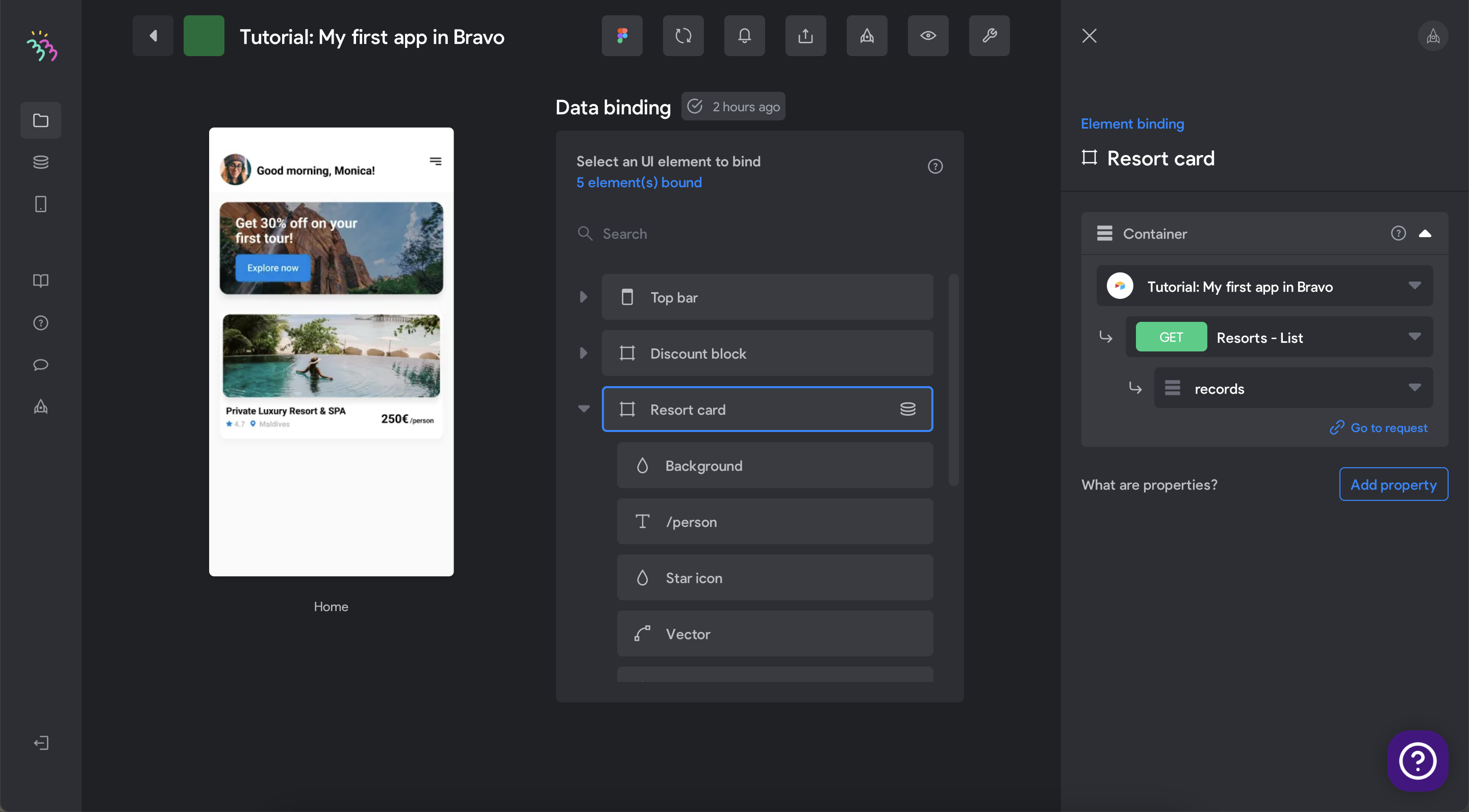
Struggling finding "Price" on this part... is the tutorial out of date? Or am I missing steps 2 - 9?!

1. Click “Resort card”. Choose property “Container” and select request “Resorts - List” → “records”. This binding will create as many “cards” as rows in the database.

attachment

We have done our first binding! Let’s continue with the rest of the elements.

10. Click *Resort card → Price. Choose property Text and select data point “price” (The request “Resorts - List“ should be already selected).

11. Do the same for *Country, *Rating and *Title, which has the same name for the data points. For *Image (IMAGE), select data point “images 0 url”.

Wrote something in this thread and want it removed? Request removal

Still stuck?

Ask the community on Discord

This archive is read-only. New questions, office hours and product updates now happen in the Bravo Discord.

Join the Discord