← Publishing
Publishing June 28, 2023 · 5 replies

Where can I find the file build.graddle ?

Archived from the Bravo community forum (2021–2026). Some answers may refer to older versions of Bravo.

Hello,

I'm looking for the build.graddle file to update my dependencies because I have a SDK error :

Your app has a non-compliant SDK version

I'm new with Bravo Studio, and I didn't find anywhere where I could modify some files.

Thanks for your help,
Arthur

5 replies

Arthur June 28, 2023

Additional information on the error :
 
Segment Analytics Android SDK (com.segment.analytics.android:analytics) 4.10.0 collects sensitive or personal data which may not be limited to Advertising ID, Android ID. We do not allow the association of permanent device identifiers with sensitive or personal user data or resettable device identifiers, as described in the User Data Policy.

Alberto Manzano Bravo team June 28, 2023

Hi  , where did you get that error exactly? Could you please share the entire error log?

Arthur June 28, 2023

Hello, I get this error in the google play console.
Unfortunately, I just launched a new build to try something to solve the problem and I  guess this error is no more available when It is being examinate. Moreover, the error was in french and quite long to translate. If my new build don't resolve the problem, i'll copy/past it in google traduction.

Thanks you
 
PS : I launched a new build without doing anything because i found a topic with the same error and he solved it by just doing that

Alberto Manzano Bravo team June 28, 2023

Yep that error was solved some time ago. With a new build, you won't have any issues!

Arthur June 28, 2023

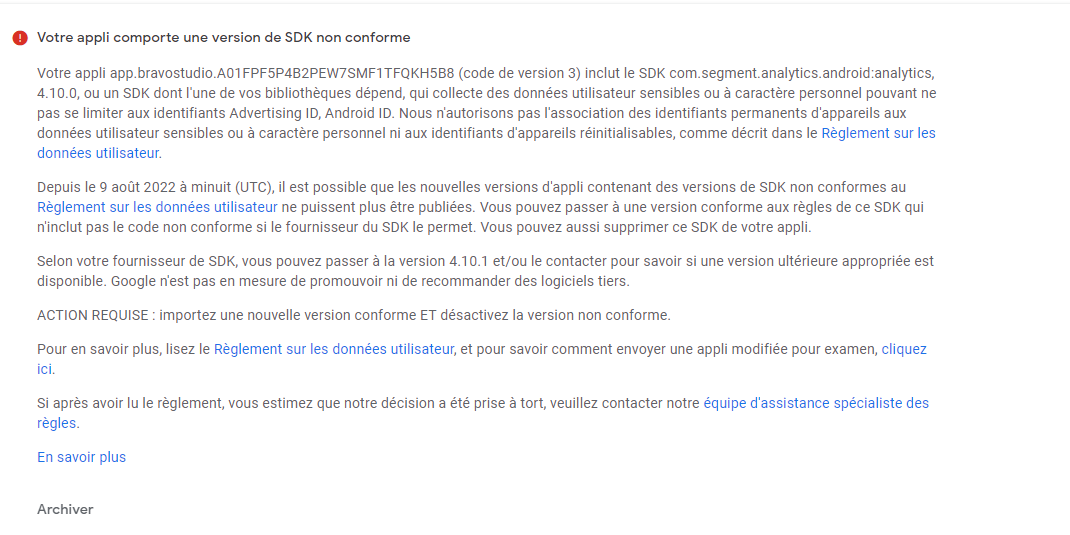
image.png

My new build is now published, and the error is still there. Here is the traduction : 


Your app.bravostudio.******************* app (version code 3) includes the com.segment.analytics.android:analytics SDK, 4.10.0, or an SDK that one of your libraries depends on that collects sensitive or potentially harmful user data. personal character that may not be limited to Advertising ID, Android ID. We do not allow permanent device identifiers to be associated with sensitive or personal user data or resettable device identifiers as described in the User Data Policy.

As of August 9, 2022 at midnight (UTC), new app versions containing SDK versions that do not comply with the User Data Policy may no longer be published. You can upgrade to a policy-compliant version of this SDK that does not include non-compliant code if the SDK vendor allows it. You can also remove this SDK from your app.

Depending on your SDK vendor, you can upgrade to 4.10.1 and/or contact them to find out if an appropriate later version is available. Google cannot endorse or recommend third-party software.

ACTION REQUIRED: Upload a new compliant version AND disable the non-compliant version.

To learn more, read the User Data Policy, and to learn how to submit a modified app for review, click here.

If after reading the rules you believe that our decision was made incorrectly, please contact our rules support team.

Wrote something in this thread and want it removed? Request removal

Still stuck?

Ask the community on Discord

This archive is read-only. New questions, office hours and product updates now happen in the Bravo Discord.

Join the Discord