← Design & Bravo Tags
Design & Bravo Tags January 17, 2024 · 9 replies

Can I add labels to custom map markers?

Archived from the Bravo community forum (2021–2026). Some answers may refer to older versions of Bravo.

I can’t seem to work out how to add labels when also using custom map markers. I don’t mean when you tap the marker the label showing up. I’d like the label to always be there like for default markers.

I’ve linked the label data to my API and it gives nothing back. (it works for default)

Thanks,

Sammy

9 replies
Marielle Ibias Bravo team January 17, 2024

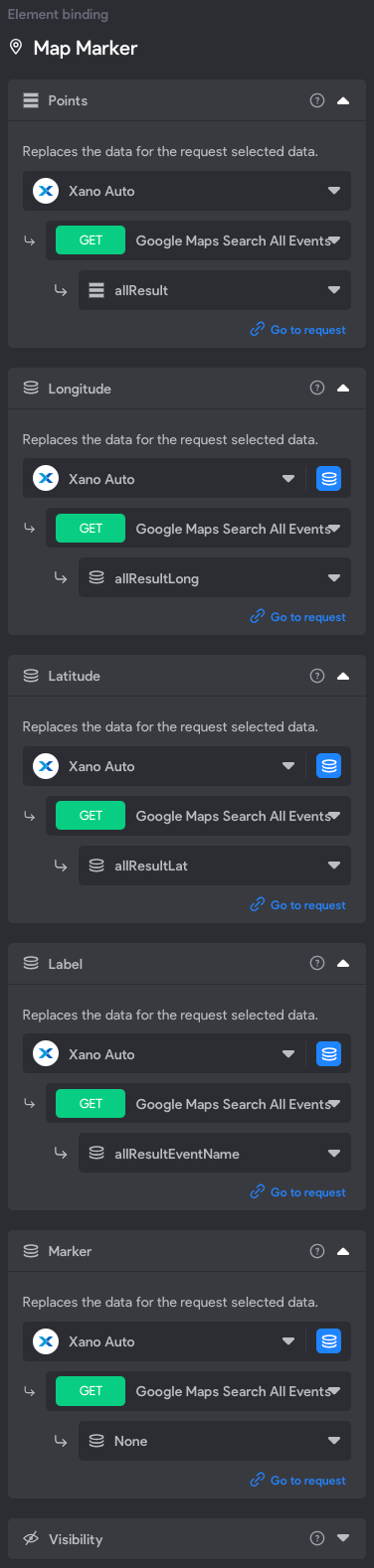
Hey @Sammy Purcell, can you share a screenshot of your bindings?

Sammy January 17, 2024

I’ve not got a bind to Markers as I am using the [asset:marker:default] tag in Figma. But everything else is bound.

Thank you!

Marielle Ibias Bravo team January 17, 2024

@Sammy Purcell that seems correct. Which device are you testing? Android or iOS?

Marielle Ibias Bravo team January 19, 2024

Hi @Sammy Purcell, as for now you can either use label or the marker, not both at the same time.

Sammy January 21, 2024

@Marielle Ibias Thanks for the update. Thats a shame. Do you know if there is a work around for this?

Marielle Ibias Bravo team January 24, 2024

@Sammy Purcell I’ll check this with the team and let you know 🙏

Marielle Ibias Bravo team March 15, 2024

Hi Sammy, Apologies it took us time, unfortunately, using both label and personalised marker its not supported and there’s no work around. Only using either one or another. Thanks for understanding!

Wrote something in this thread and want it removed? Request removal

Still stuck?

Ask the community on Discord

This archive is read-only. New questions, office hours and product updates now happen in the Bravo Discord.

Join the Discord