Archived from the Bravo community forum (2021–2026). Some answers may refer to older versions of Bravo.
Hi there!
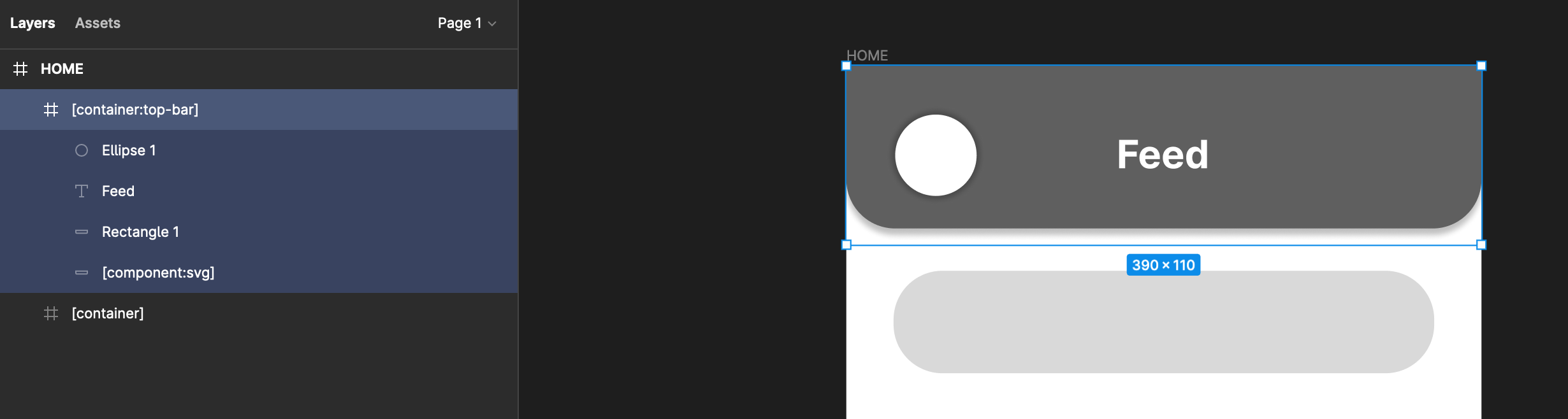
To execute a design in which a top bar has elements overlapping into the scrolling container below, I haven't been able to find a workaround. It seems that the top-bar tag doesn't allow for transparency within the container nor drop-shadows to the adjacent container below. I've added a screenshot to illustrate - perhaps somebody knows of a solution? (container:top-bar)

29 replies
You mean like this ?
almost - including the slopes on the sides for the top bar
like this ?

actually, yeah. How did you do that?
You can add as many elements as you want in the containers in general and top bars. Try adding a rectangle as the last layer with the corner radius and shadow, it should work.
I'm having issues with the transparency though. I would need the content from containers underneath to scroll up under the top bar container and it's just cutting off at the boundary. Overlapping the two containers also doesn't seem to work..
your « corners » are oriented to the bottom and that can’t work if it’s what you mean.
Still, you managed to get a drop shadow on the layer below - how does that work, if containers are separated by borders and can't overlap?
- no background color on container
- create a rectangle of the size of the container for the background
- create a rectangle of the size of the container under the previously made background to make the shadow (use component svg on this component)
- now increase container’s height of 10px so it is 10px more than the rest
And voila 😊
I'm really sorry to keep bothering with this petty issue, but I still can't get it to work.. to clarify, you create a duplicate rectangle underneath and then just apply the drop shadow effect to the bottom one?
And increasing the container height allows for the shadow to be displayed, but still cuts off the layer scrolling below with an opaque white bar to the border of the container..
did you remove the white fill on the topbar container ?
And put a white fill on the first layer frame ?
Do you need something like that? https://www.figma.com/file/fZ8zZXtWHZH35oDt4mOPFW/topbar-shadow%2Btransparent?node-id=0%3A1
Yes, I did everything as instructed, but this is what I see on the bravo vision app... I've attached the file here. What am I missing?

see the shadow that is « cut » ? The upper frame should be like 10px taller so it shows the shadow. And the content container has to begin after the upper container.
This I mean (forgot the image)
well, in that case you get this, since the border of the content container starts after the top bar container and won't scroll under:
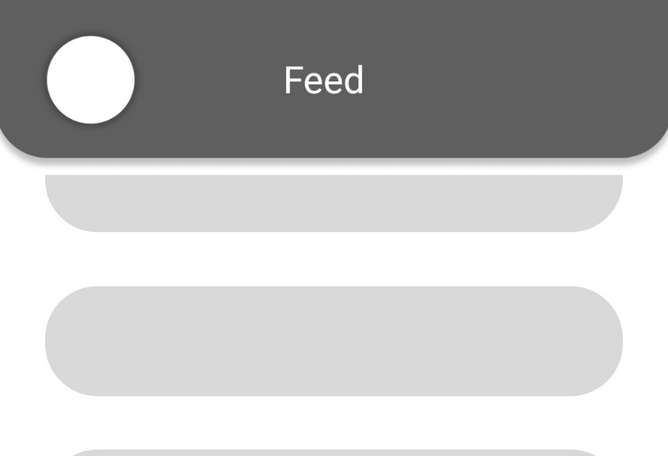
Yes that's because you didn't do what I told you to a few days ago.. Remove the fill color of your container background!
You have to think how your Figma file is organized. If you have a white space when you expand a frame, then there is a color in the "fill" section of the frame OR you have created an element "background" into this frame that has a color in his "fill" section.
Yes I did. I think the issue is that by extending the border of the top bar container by 10px to display the shadow, the content container below stacks adjacent to the extended border and hence cuts the scroll off right at the container border and not into the shadow as I would like it to. Do you perhaps have a working version that I can preview on Bravo Vision?
I will share as soon as I get on my computer.
I have previewed this file on Bravo vision and the shadow was cut off as well...
So make sure :
- Main frame has a white fill
- Top bar frame has no fill
- Scrollable frame has no fill
This has to work, but this is a Figma config you are missing. Definetly not a bug. I just created a new app and it works just fine.
if you preview your app on Bravo Vision (on the phone), is it displayed correctly as well? I'm really confused, since I have basically tried tweaking every possible parameter and already spent way too much time self-troubleshooting. If you'd check this file, all the criteria you specified should be fulfilled: https://www.figma.com/file/2BDXyrVIEfaFM68xkjALgk/Untitled?node-id=0%3A1
Perhaps this is a bravo vision issue then?
No, I know what you can do.
Don't use dropshadow on the bakground element.
Duplicate your background that has [component:svg] and put it under
Give grey color to the new background
Activate layer blur on this new background
Give value 15
Will work 🙂
I appreciate your help, but this really seems to be a feature issue. Since the scrolling container cuts off at the upper boundary, the top-bar container with the shadow needs to have the border extended far enough to display the shadow, and an overlap between two containers is not possible, they are always going to have a gap in between..
I tried your suggestion, but it's still the same thing. I wonder how you made it work with your app
well IDK, it works on all my apps 🤷🏼♂️
Hi, how can we do that?
Hi, have you discovered?
Wrote something in this thread and want it removed? Request removal
Ask the community on Discord
This archive is read-only. New questions, office hours and product updates now happen in the Bravo Discord.
Join the Discord