Archived from the Bravo community forum (2021–2026). Some answers may refer to older versions of Bravo.
Right now I have a page that displays a list from my air table, but I also want to get an image from the list. What do I do in Figma so that I can get the image? Do you add a rectangle element with a certain tag?
Also, I'm having such a hard time finding a place to go learn these basics, where would I go to learn something like this question, for example, other then posting about it?
Thank you
25 replies
For your first question : rectangles are fine. Then you bind it in Bravo. No tag needed.
For the second question, type Bravo Documentation in Google and voila !
Hello in order to learn Bravo from basics we have several sources:
- Bravo Documentation (help center) (the same as Bastos proposed)
- Youtube channel, where you will find several tutorials and videos on how to do things in Bravo
- In our website we have the academy, where you will find some courses to follow step by step and understanding the Bravo concept.
I hope you can become an expert soon!🤘👏
I can recommend the playlist section of Bravo's YouTube channel to get started (also features some video from other creators): https://www.youtube.com/c/BravoStudioapp/playlists
I went through the help center and couldn't find any documentation on this question. Also the Academy is split into sections "B,R,A,V,E". Section "V" is clickable but sends you to no link & "E" isn't clickable and says coming soon & I watched every video in B,R,A and it doesn't answer this question. As for the youtube videos, there is no title that talks about it or any video I found so far. I'm sure someone did it in their video but it's basically a hunting game. That's why I was frustrated yesterday with Bravo, seems like such a simple question a beginner would ask but I coudn't find the answer. Appreciate your message though, thank you so much.
I'm trying to bind it but it doesn't show up. Is there an issue in the way I'm binding it? Also there are 2 different fields for each sheet "list" & "details". Which one should I be using to retrieve the image? What's the point of them even.
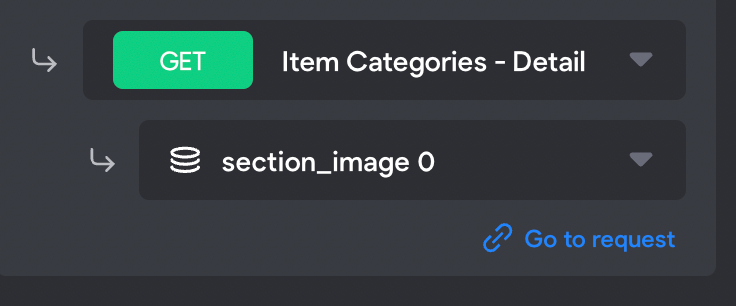
the answer is in your question. If you want to bind elements that are in a list, then bind it from the list get request.
I'm sorry I'm new to Bravo and am not sure what you mean.
There are 2 different fields for each sheet "list" & "details". Which one should I be using to retrieve the image?
@
I binded it this way and it still doesn't work. What's the issue?
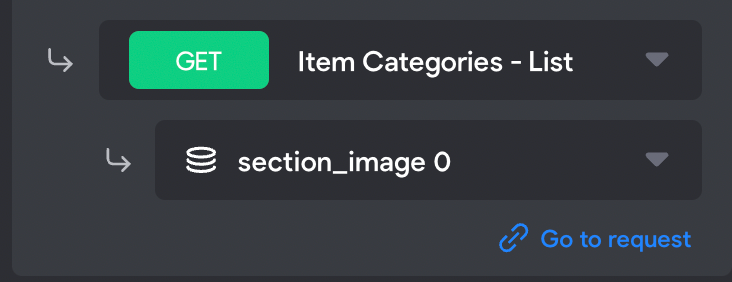
if you want the image to show in your list page, then you have to bind everything from your list get request. If you want the image to show in your details page, then you have to bind everything from the details get request.
Alright, so in this case I want it to show up in my list page. How can I tell bravo this? Do I have to tag the page with something, like we do with menus?
Also, why is the other fields retrieving fine but not the images
All I'm trying to do is get the image from Airtable & I still am not able to do so, here's what I understood from our back and forth:
1. There are 2 types of pages, Lists & Details
2. If you're dealing with a List page then you get images from the List section.
I tried both fields "List" & "Details" to get the image and it still doesn't work. The only reason why it woudn't work would be because of 2 reasons:
1. Bravo has no idea that the page I'm working with is a List or Detail page, and if that's the case. What tag would I use to tell bravo this
2. The sub-category is wrongly selected. There are many options for images ranging in sizes, URL's, ID, etc. I chose, "Section_image 0", as seen from the screenshots
Sorry if I'm being annoying, it's just that your answers have not yielded the desired outcome from my project, just want to get to the bottom of the solution.
There is no answers within the Bravo Documentation that i've found that answers this question.
make sure that in your list request you select “all” besides image then select url.
I’m the detail request, make sure to select 0 besides image and then url.
"In the detail request, make sure to select 0 besides image and then url." I did that, still not working
"make sure that in your list request you select “all” besides image then select url." I don't know what you means by that. I don't see an "all" option anywhere.
not having your screens under our eyes is complicated to help. What I can advice you is to duplicate an App from the templates and check how they made it work so you better understand.
I'm just looking to get an image from a spreadsheet & display it in Bravo. I did everything you said and it still doesn't work. the only thing I didn't do is this:
**_"make sure that in your list request you select “all” besides image then select url."
_**Can you show me a screenshot of where this "All" button can be found. I'm not sure why I'm able to retrieve all the other data on my spreadsheet except for these images.
I’m on mobile, don’t have access to it and sorry.. it’s the weekend and it’s not even my full time job 😅
If saw you posted a lot of questions and it doesn’t help you. Maybe it would be great in your case to ask for Bravo Professional Services
I appreciate you trying to help, thanks anyways!
Can you provide help here? Here's the summary:
1. I have images in a airtable Sheet
2. I want to display these images as a list in Bravo
I'm able to get other data like text fields, just not the images.
Recomend you to take some time first and before to start figma/bravo/airtable to watch some or maybe all videos on bravo youtube channel. Take it as lessons, Bravo is a no code but its not a pick and drop.
This is great advice Valter. After watching the some more videos & reading documentation I was able to figure it out. Than you
👍
I hear you figured it out?
Yeah! Sorry about all the questions aha
Great!
Hi Moshi Karim,
Please take a moment to tell everyone how you resolved your image issue. There are lots of newbies out there and they could benefit from your experience. Thanks in advance, Mary
Wrote something in this thread and want it removed? Request removal
Ask the community on Discord
This archive is read-only. New questions, office hours and product updates now happen in the Bravo Discord.
Join the Discord