← Design & Bravo Tags
Design & Bravo Tags August 16, 2022 · 10 replies

Figma line element not appearing in Bravo vision

Archived from the Bravo community forum (2021–2026). Some answers may refer to older versions of Bravo.

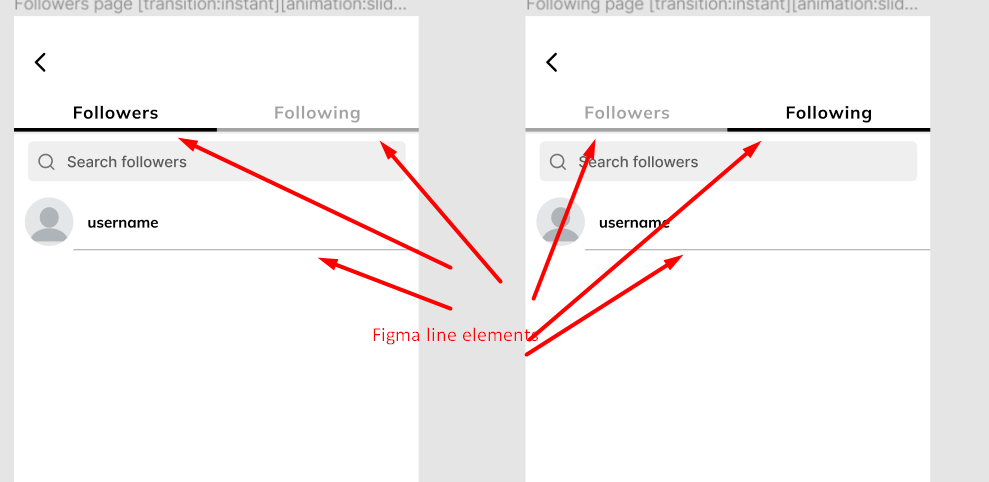
The line element doesn't seem to appear in bravo vision. All my line elements are appropriately inside the containers, they just don't seem to appear when I test the app. It was working a few weeks ago.

10 replies
Alex August 16, 2022

Same, they used to work.

For now, I ended up calling them [component:svg] and they showed up again?

retrogatorade August 16, 2022

I tried this and it's still not working for me :/

Alex August 16, 2022

I also kinda arbitrarily re-grouped the line? And maybe that helped.

I'm sure  and team are ontop of it already if you filed a bug.

Marta Serrano Bravo team August 17, 2022

Hello! 
Could anyone share more details information?

  • Sample Figma file / App ID
  • Device happening: iOS, Android or both?
  • Video recording...

It will be much appreciated!
Thank you!

retrogatorade August 17, 2022

Here's an example of a couple pages in my app

image.png

▶ Video: RecordIt-1660756620.mp4

All the line elements in my figma file just disappear in bravo vision. This happens across the app, not just these pages. I am using IOS.

Em August 18, 2022

Hi, I used to have this issue, I just used a rectangle instead of a line element then set the width to 1 and it worked fine.

Marta Serrano Bravo team August 18, 2022

Yes , it's better to use rectangles or if you are using lines is better to outline the stroke to crate a shape. The way Figma and mobile handle lines is tricky to match, so using shapes is much easier. Did you try that?

Leonidas August 19, 2022

I had the same issue out of nowhere few days ago as well. I ended up converting strokes to outlines (shapes) and it worked ok after that. It was a weird issue though because some stroke elements worked and some didn't.

Alex August 19, 2022

I also get a similar issue with some rectangles. My Figma file shows them with rounded corners, but then my live app & vision app show just normal rectangles with no-rounded corners.

Wrote something in this thread and want it removed? Request removal

Still stuck?

Ask the community on Discord

This archive is read-only. New questions, office hours and product updates now happen in the Bravo Discord.

Join the Discord