← Design & Bravo Tags
Design & Bravo Tags June 2, 2022 · 3 replies

Importing design with multiple horizontal sliders

Archived from the Bravo community forum (2021–2026). Some answers may refer to older versions of Bravo.

Im trying to import a figma file with an artboard that contains multiple horizontal sliders.
I created the first two no problem, however the rest seem to give out an error when importing into studio.

I know the horizontal sliders are the ones causing trouble because if I delete them and try to import, it does it without errors. as soon as i bring back the sliders that Im pointing out in the photo attached, the problem appears.

These sliders are 2nd level, no typos on tags, etc
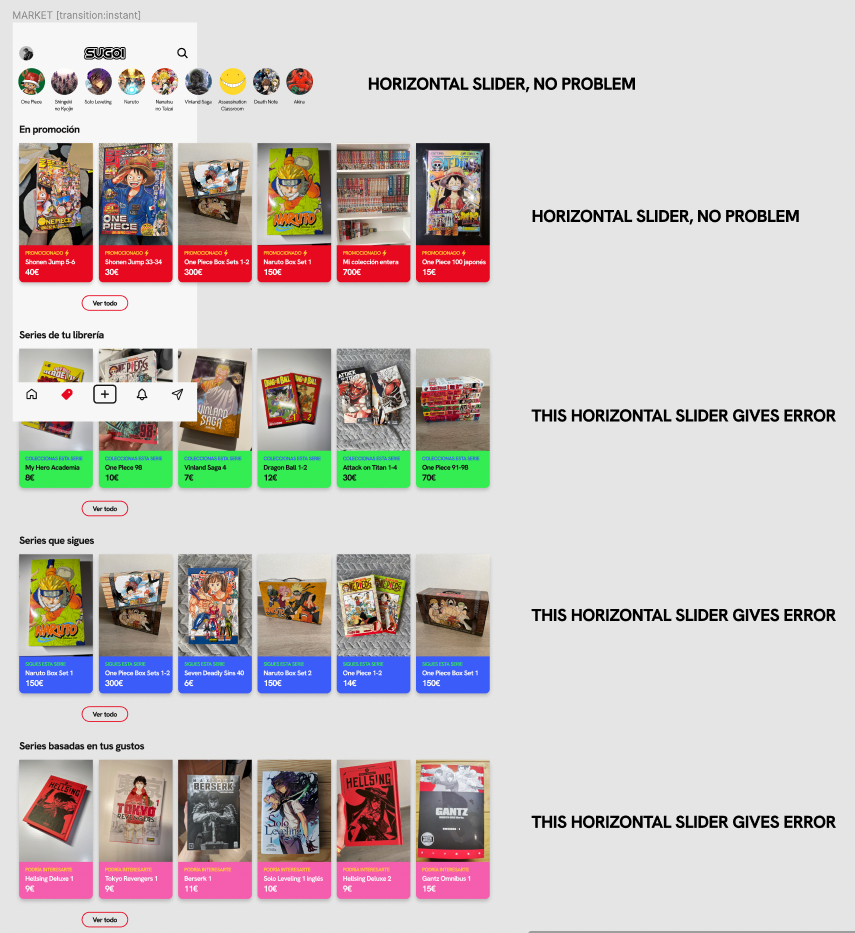
Captura de pantalla 2022-06-03 a las 0.57.17.png

3 replies

Bastos June 3, 2022

First of all, I recommend you to follow the tutorial for the menu page. You don’t have to replicate your menu on every page, it doesn’t work that way.

https://docs.bravostudio.app/bravo-tags/menus/tabs-menu

Then, I assume you did not read all the doc about horizontal sliders as you put all your data in Figma instead of Airtable. This is not dynamic if you work that way.
Follow this tutorial and start at point 5 using the horizontal slider tag :

https://docs.bravostudio.app/bravo-tags/containers/container-horizontal-slider

Ignacio June 3, 2022

Hi, 
as for the menu, i am aware how it works. There are actually two menus on the design, and as you probably know, there cant be two menu tags on bravo, so i have the tab bar menu as a layer to be able to have both, and thats working just fine, thats not the problem.

as for the documentation for horizontal sliders, i have read it of course. i followed all the steps there, just dont want to populate with data from airtable or any other source yet.

Bastos June 3, 2022

Everytime I faced issues with horizontal slider it was a design problem. Maybe you can share your Figma file so someone can check at it

Wrote something in this thread and want it removed? Request removal

Still stuck?

Ask the community on Discord

This archive is read-only. New questions, office hours and product updates now happen in the Bravo Discord.

Join the Discord