← Design & Bravo Tags
Design & Bravo Tags September 16, 2021 · 7 replies

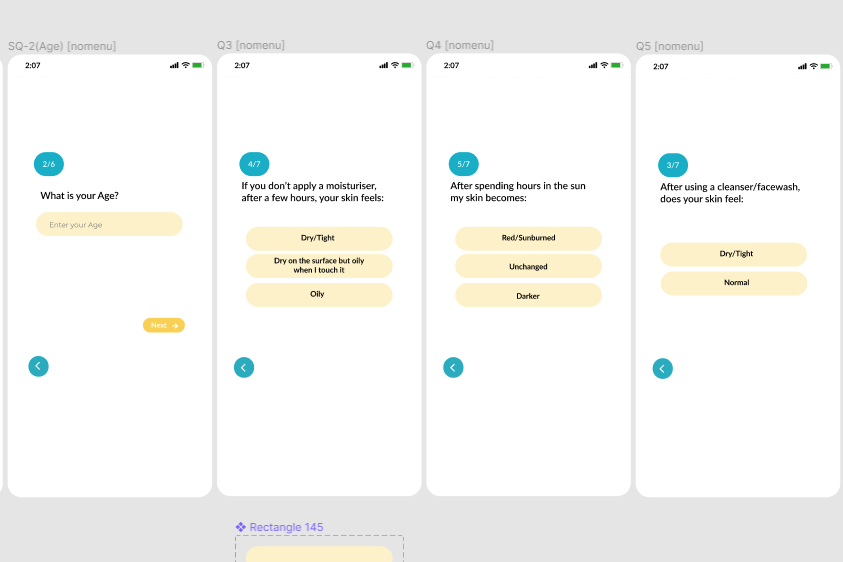
Is it possible to post information from buttons to airtable while creating a user profile?

Archived from the Bravo community forum (2021–2026). Some answers may refer to older versions of Bravo.
BravoDoubt.PNG

7 replies

Javier Felipe Bravo team September 20, 2021

Hi ,

Yes, you can bind a submit action to each of the buttons, so the data on each screen is submitted via API request.

Cheers!

Novia October 13, 2021

Hi   I have the same issue, so I tried [action:submit] / [component:input-file] /[component:input-text]/ 
well basically all commands of input under Input Bravo Tag, but it's still not storing my data to my airtable, any idea why?

Javier Felipe Bravo team October 13, 2021

Hi , could you send us an email to support@bravostudio.app, indicating the app details (Bravo project URL + link to design file)? That way we can check out what the issue might be. Thank you!

Ria October 22, 2021

Hey Javier, on binding submit action to each of the buttons, only the data from the first option is being sent to Airtable even when other buttons are being clicked on. Is there a way to tie a submit action to each Input?

JZ February 24, 2023

Is there any other information anyone from Bravo can share about how or if this was resolved? I'm trying to set up something similar but I get an error saying that only one form is permitted per screen.

Wrote something in this thread and want it removed? Request removal

Still stuck?

Ask the community on Discord

This archive is read-only. New questions, office hours and product updates now happen in the Bravo Discord.

Join the Discord