← Design & Bravo Tags
Design & Bravo Tags June 10, 2021 · 6 replies

Lines

Archived from the Bravo community forum (2021–2026). Some answers may refer to older versions of Bravo.

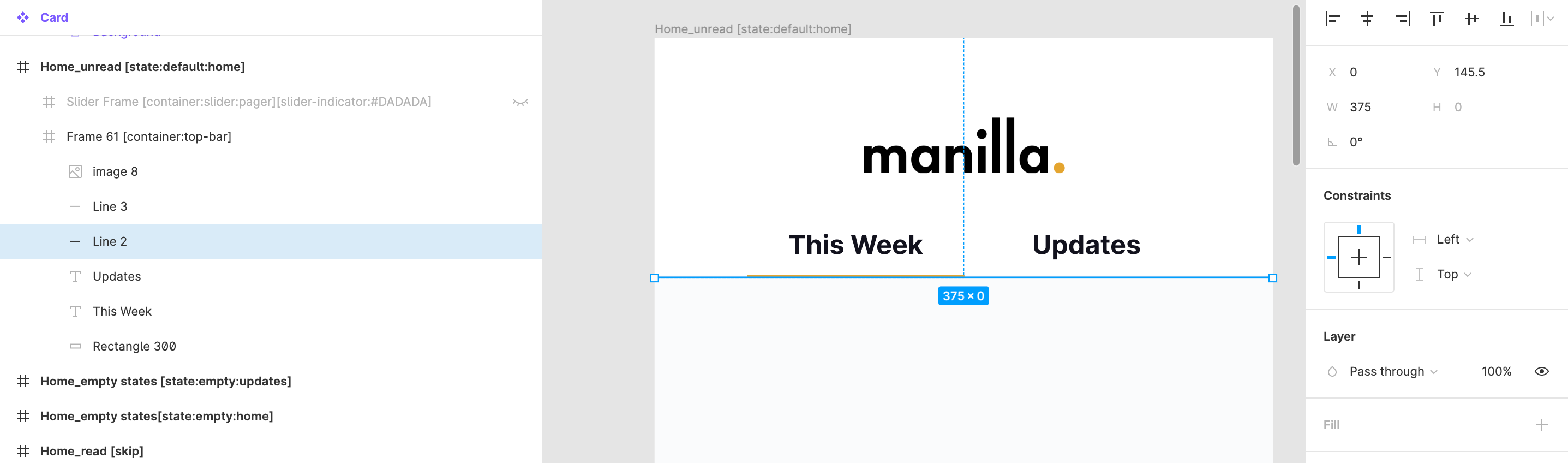
All of my lines are showing errors saying it is outside the container. I'm working in Figma on frames that are 812x375. The container that my lines are in is 375 wide and my line is 375 wide. 

Is my only choice to make my line 374.9? Seems strands since it doesn't show error for boxes and images that are full bleed.

6 replies
Karla June 10, 2021

* What is that you are trying to create?
* What is the trouble you ran into?
* What did you do so far?
* What is the result you need?
* Great, you can use other ways to explain? printscreen, Figma, airtable, videos (loom.com)?

Zeke June 10, 2021

Screen Shot 2021-06-10 at 4.12.08 PM.png

Getting errors in bravo for horizontal lines.

Karla June 10, 2021

Try turn them into outline stroke, try also SVG Component Bravo Tab, if that doesn't work. But, if it appears on Bravo Vision, you can also dismiss the message :)

Zeke June 10, 2021

Okay I tried those and no luck. Just hate having the errors!

Javier Felipe Bravo team June 11, 2021

Hi , you can share with me your Figma file and we can check if there's any issue. What is the error message you're getting?

Karla June 11, 2021

I get you, without the file impossible to reproduce it and help you further :(

Wrote something in this thread and want it removed? Request removal

Still stuck?

Ask the community on Discord

This archive is read-only. New questions, office hours and product updates now happen in the Bravo Discord.

Join the Discord