← Design & Bravo Tags
Design & Bravo Tags August 19, 2022 · 13 replies

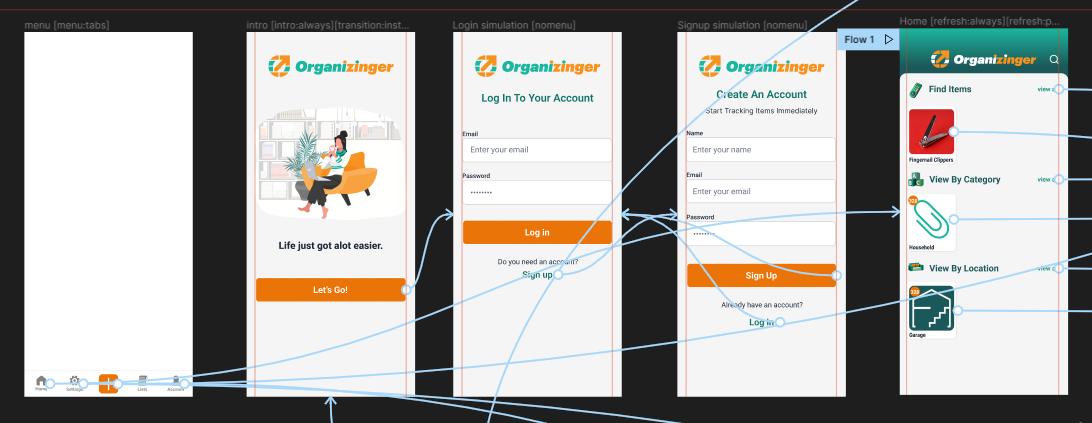
Menu Tabs Stopped working?

Archived from the Bravo community forum (2021–2026). Some answers may refer to older versions of Bravo.

Hey all,  

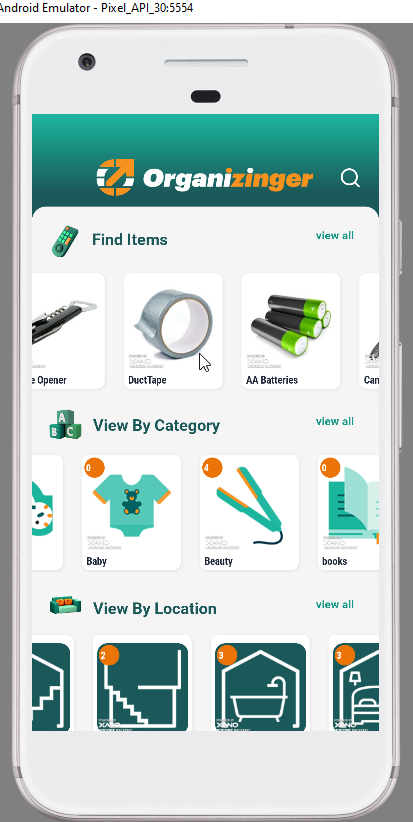
I've been working on my little app for a while,  my menu tabs have always worked correctly, but I noticed they just recently stopped displaying. 

As far as recent changes,  I recently switched all my apis from backendless to xano,  then I was trying to work on authentication so there have been a lot of switches, but I wouldn't think those would have anything to do with it? 

It's been a while so I may have just forgot something simple?  This is the figma file at least, and there are no apis associated with the menu page so I don't think it would be a visibility thing?   

I've also tried to disable all of the auth stuff for now to consolidate all my apis into a single collection that I loaded through a swagger import.  again I don't "think?" that would have anything to do with it? 

Also, it actually shows up for a brief second and all links are clickable before I enter into the home screen?

13 replies
Alberto Manzano Bravo team August 22, 2022

Hey  could you please share your Bravo app URL so we can take a look at this?

Casey August 22, 2022

thanks!  I PM'd it to you, is there any issues with me posting links like that publicly?

Casey August 22, 2022

Hey Alberto! I see it's working now, THANKS!  could you let me know what was the issue?

Alberto Manzano Bravo team August 22, 2022

might be something related with the Figma import. In any case, in apps with login and tab menu, the menu will not be displayed until the user logs in (or signs up). Maybe that was related with the initial issue

Casey August 22, 2022

Ok, cool that helps a lot so I have to keep working on my user authentication.  Makes sense, still trying to get that right.

Greg September 5, 2022

I am also having the same issue. I am using Xano. And after much troubleshooting the issue seems to be related to login. Please explain the issue and how to fix it.

Casey September 6, 2022

For me the issue was the menu tabs would not display if I was not logged in after I had setup the user authentication, after that I can't get to any pages that have menu items if I'm not logged in, so i never run into the problem.

Multy April 3, 2023

I have the same issue, and the frame that contains the menu:tabs tag seems to not be imported. Do you have any advices ?

Mateo April 8, 2023

got the same issue here, let me know, if you fixed it.

Wrote something in this thread and want it removed? Request removal

Still stuck?

Ask the community on Discord

This archive is read-only. New questions, office hours and product updates now happen in the Bravo Discord.

Join the Discord