← Design & Bravo Tags
Design & Bravo Tags September 12, 2022 · 6 replies

Position popup at bottom of screen

Archived from the Bravo community forum (2021–2026). Some answers may refer to older versions of Bravo.

Hello.  Is there a way to position a popup at the bottom of the screen please?

6 replies
Divyansh September 12, 2022

Yes there is a workaround cheat, make a popup of full frame of your mobile screen, they make the upper part invisible by remove the "fill" of that part. Could be done like:- Header container will have rectangle with no colour, bottom part will have that container which will contain your popup elements. 
This way always your popup will be at the bottom.

Kris September 12, 2022

Hi Divyansh,

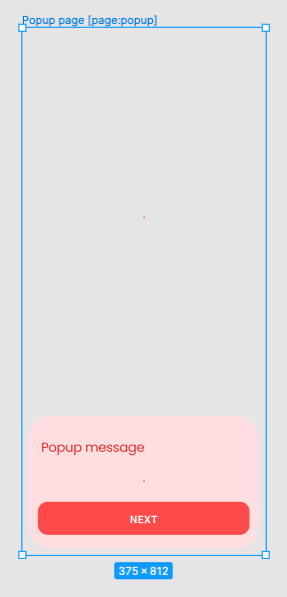
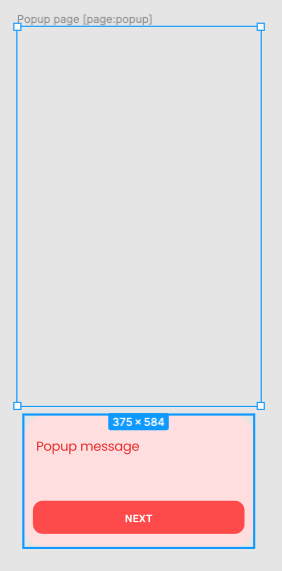
Thanks for your reply.  I think I've done what you said.  Two frames inside a full frame.

This makes the popup content appear towards the bottom of the page if the screen is the same as my full frame.  But this doesn't work for screens of different sizes.

Am I doing it wrong?

Screenshot 2022-09-12 at 15.51.26.png

Screenshot 2022-09-12 at 15.50.54.png

Divyansh September 12, 2022

I have tried this bottom popup on my app as well and on different android screen, and there was a little gaps but not too much to hinder my design.
I think you can try aspect ratio if you want if you are looking for exactness in your design. Maybe this would work.
But yes little bit of changes can occur but not a major one.

Kris September 12, 2022

Sorry, I'm new to figma - what does try aspect ratio mean please?

Wrote something in this thread and want it removed? Request removal

Still stuck?

Ask the community on Discord

This archive is read-only. New questions, office hours and product updates now happen in the Bravo Discord.

Join the Discord