← Design & Bravo Tags
Design & Bravo Tags November 23, 2021 · 13 replies

Select input value not showing API data

Archived from the Bravo community forum (2021–2026). Some answers may refer to older versions of Bravo.

When I bind a select input value to API, I cannot get the value to appear in the label. It still shows the default label from Figma, even though the value is connected properly (when I save, the value gets passed).

Am I missing something or does this not work? Could it be because I have the select options hardcoded in Figma and that's why the input cannot find which value to preselect?

13 replies
Marta Serrano Bravo team November 25, 2021

Hello  Could you share the Figma File with us to check how is it setup? Which tag are you using for the Selector input?

Matouš November 25, 2021

Of course, I'll send it to you via DM. The tag is [component:input-select:Sparse,Normal,Dense].

Marta Serrano Bravo team November 25, 2021

Could you try without the hardcode data? Since you are connecting to an API you do not need this values. The tag should be: [component:input-select]

Matouš November 26, 2021

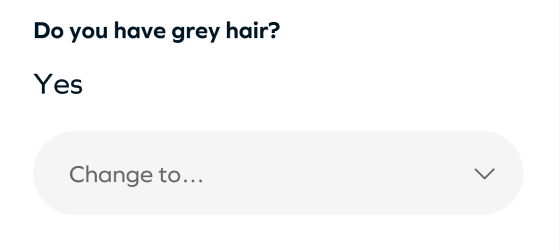
I've just tried it. Either with no options/values at all or with options/values coming from an API. Either way, the input label always stays set to what I have in Figma, no matter what I do. After I choose one of the values, the label changes to the option I've selected, but I need the placeholder to show the value the user has selected previously, when the screen loads, like so:

image.png

Just like it works with the text inputs. If I can't do that, I have to compromise and have a separate text layer where I show the current value and under it the select with a placeholder "change to...".

image.png

Is there any working example of a select input that gets its placeholder from an API value I could have a look at to understand what I'm doing wrong?

Myron December 4, 2021

I am also having this problem. The placeholder text is never updated by API data, but other types will update with the same data (text or text input).

Matouš December 5, 2021

I'm talking to the support team to try to figure this out. Will post an update here when it's resolved.

Bastos March 26, 2022

Still no solution for this ? 
I have the same issue

Bastos March 26, 2022

[component:input-select] does not show any value on my side.. I have to put hard code

Ken June 26, 2022

What was the update here? Having this issue now

Marta Serrano Bravo team July 14, 2022

Hello!
Which backend are you guys using?  you contact support already for that, did they do not give you a solution?

Wrote something in this thread and want it removed? Request removal

Still stuck?

Ask the community on Discord

This archive is read-only. New questions, office hours and product updates now happen in the Bravo Discord.

Join the Discord