← Design & Bravo Tags
Design & Bravo Tags Solved July 11, 2022 Β· 9 replies

Shadows in Carousel slider not visible

Archived from the Bravo community forum (2021–2026). Some answers may refer to older versions of Bravo.

I implemented shadows in slider cards in figma, but in Bravo Vision its not showing up the shadows for any of the slider card.
Any idea and solution ?

9 replies
app.monster July 11, 2022

This is probably due to the shadows being outside of the container. Please share a screenshot of your Figma setup

Divyansh July 11, 2022

, thankyou for your reply , so Here it is :-
Figma:-
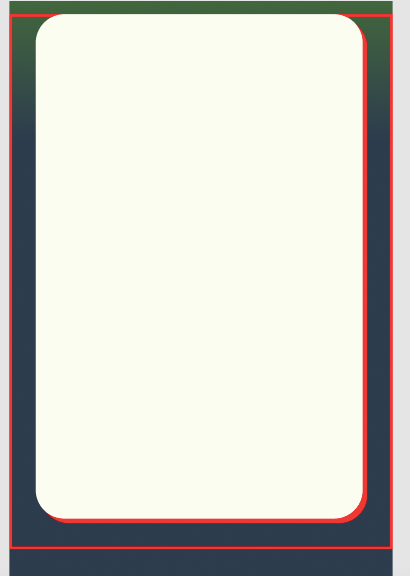
Red boundary is Frame (for main container) and also then same width Frame (for slider)
{just the exact setup mentioned in examples}
Finally Red on card is its shadow

Screenshot 2022-07-11 at 11.12.15 PM.png

In Bravo Vision (android):-
Carefully see there is some part of red shadow visible, I diagnosed and realised that the part of shadow visible is only that left space in the rectangle of this card (since I have curved the rectangle, that corner left space)

Screenshot_2022-07-11-23-13-21-650_com.appfoundry.previewer.jpg

Also  , you will be surprised to know that when I tested the same thing in Bravo Vision for iPhone it worked EXCELLENT, like just as it is. 😐
Please help!!

Alberto Manzano Bravo team July 12, 2022

please share your app url when you file a bug report! Thanks πŸ™‚

Divyansh July 12, 2022

done I will be reporting it again this time with app link, you can run it in your own android device to verify and solve it then, I will ping you when I will do in 1/2 hrs, would that be fine?

Divyansh July 13, 2022

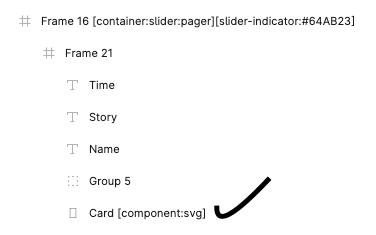
I found the way πŸ₯³, I placed [component:svg] tag on rectangle (card).
Also I found these things out :-

  1. Β If I place rectangle(card) inside a group, inside Slider Frame, the shadow will not show no matter even if I place a component svg tag on rectangle(card) or not.
  2. If I place rectangle(card) inside Slider Frame (just like normal), the shadow will not show.
  3. If I place rectangle(card) inside Slider Frame (just like normal) andΒ  added a svg tag, then just like magic it works πŸ™‚

This was my configuration (which worked) :-

Screenshot 2022-07-13 at 9.16.27 AM.png

Worked in Android this way.
(and it will work in iPhone any way. Tried and testedπŸ‘Œ)

Alberto Manzano Bravo team July 13, 2022

thanks for this! Very useful feedback. We will investigate if it's possible to make it work in a simpler way for Android. Shadows in Android are a quite painful to implement, and quite easy in iOS πŸ˜…

Wrote something in this thread and want it removed? Request removal

Still stuck?

Ask the community on Discord

This archive is read-only. New questions, office hours and product updates now happen in the Bravo Discord.

Join the Discord