โ† Design & Bravo Tags
Design & Bravo Tags December 24, 2022 ยท 2 replies

Variable - Options Conditions

Archived from the Bravo community forum (2021โ€“2026). Some answers may refer to older versions of Bravo.
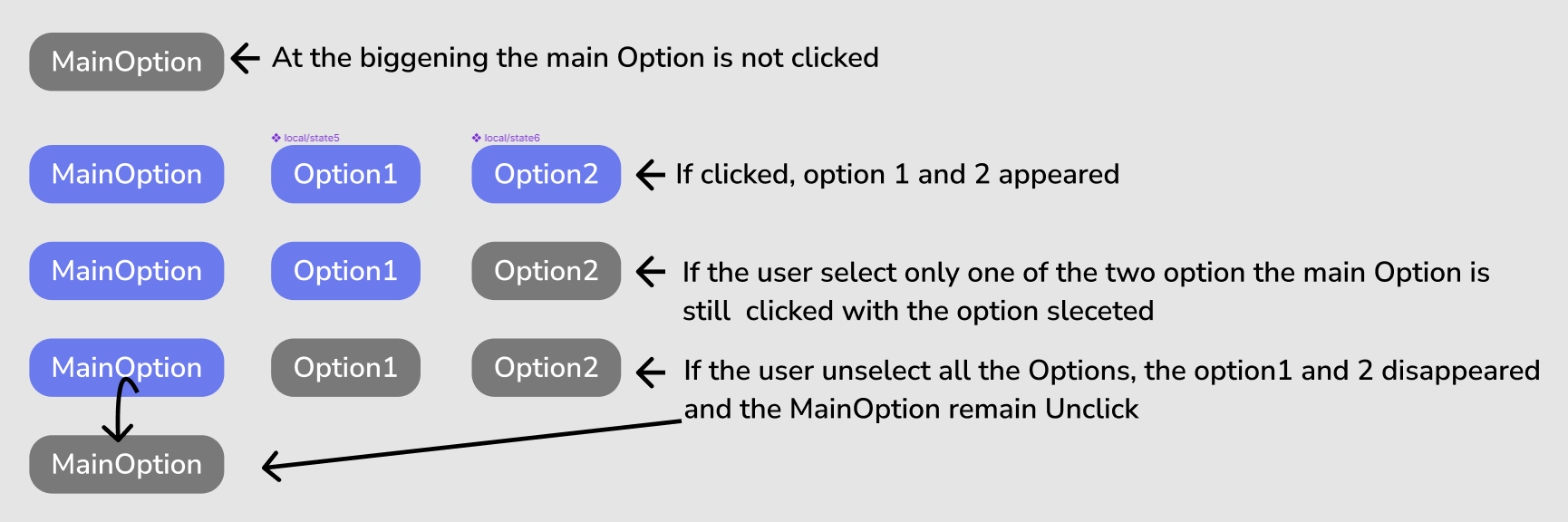
image.png

Hello,
Can you please tell ma how I can do that in Figma and Bravo ?
Please don't re-direct me to that page because my request is a little bit more complexe.
When you tried to click a button and some new components shows up and also how to send all those option in airtable with the User ID that is already connected. ๐Ÿ˜…
Many thanks,

2 replies

Javier Felipe Bravo team December 26, 2022

Hi ! In order to create this kind of logic, you need to implement it in your backend and manage the component states from there. In Bravo, you'd need to create remote actions and refresh the screen every time the user presses one of the components, so the new states are applied.ย 

You might struggle a bit to implement this with Airtable alone. You might need to use a connector tool such as Zapier or Make, or a full backend like Xano to get this implemented.

Hope it helped :)

B4sti3n December 26, 2022

Thank you for your answer, i'm sorry but I don't see exactly how you can make appeard on the app something you get back from a Remote action Tag, do I have to design that in transparent in my app ? So when I get back the name of the different options I have to make differents bubbles ? How is the logic behind that ? ๐Ÿ˜…

Wrote something in this thread and want it removed? Request removal

Still stuck?

Ask the community on Discord

This archive is read-only. New questions, office hours and product updates now happen in the Bravo Discord.

Join the Discord