← Design & Bravo Tags
Design & Bravo Tags May 11, 2022 · 4 replies

Why are my font weights not showing on the app?

Archived from the Bravo community forum (2021–2026). Some answers may refer to older versions of Bravo.

Hi there,

New to Figma and Bravo and was hoping I could get some help please.

Can't seem to get any font weight's showing within Bravo's preview app for an app I'm building. 

The font's display fine in Figma and in the desktop view of Bravo, just not within the Bravo App.

If you need anymore info from my side to help out solving this issue please ask!

Cheers,

Joelson
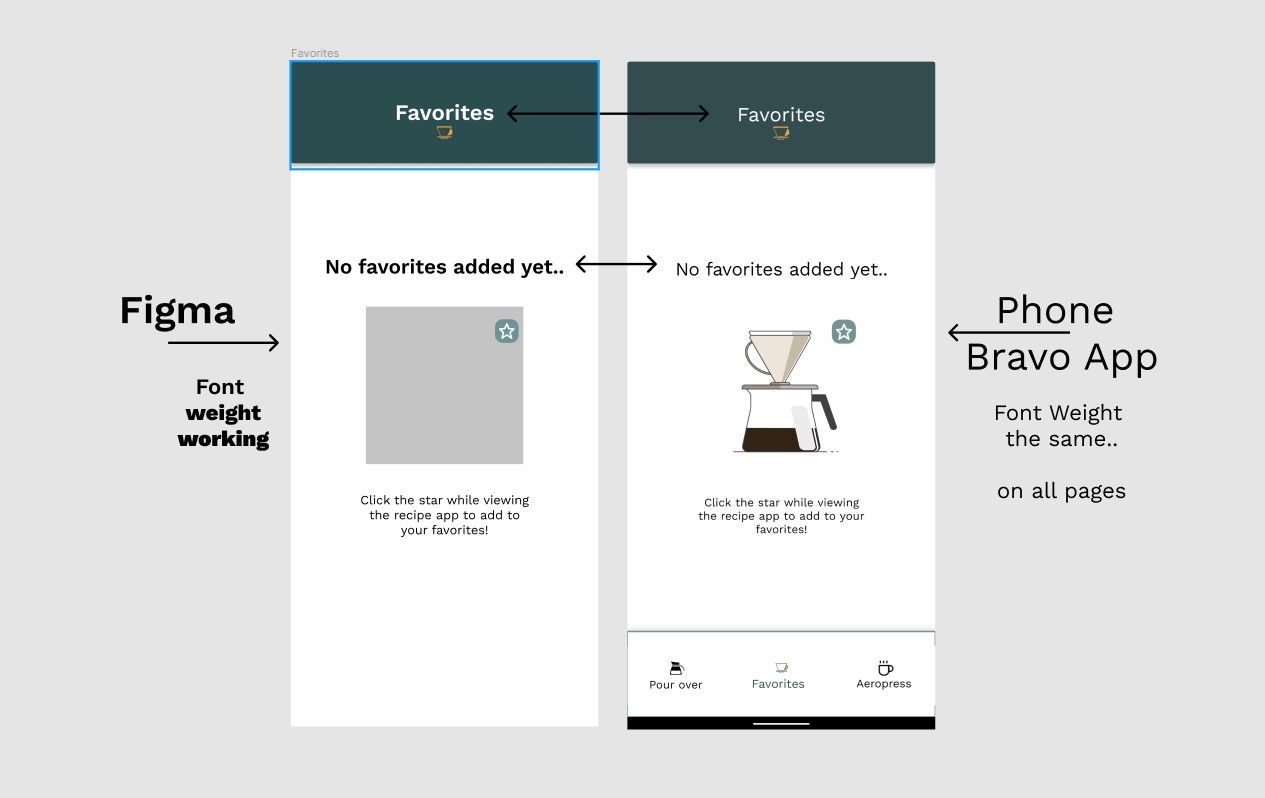
Bug font weight.jpg

4 replies

retrogatorade May 11, 2022

This also sometimes happens for me.

Joelson May 12, 2022

Somewhat solved it!

Flattened the text, turning it into a Vector as shown in a video from the app.monster guy.

If anyone has a better solution I'd love to know.

Diego Iglesias Bravo team May 13, 2022

Hey  just to confirm, have you imported the bold (or semibold) version of that font? Do you see any error on the notification bell when you sync the design in Bravo Studio?

Joelson May 14, 2022

Hey thanks for the reply! I'm using Work Sans which was already a font within Figma and didn't see any error notification bell..

I think I wasn't tagging things properly..
Once grouping text together with something else I added the [component:svg] tag to the group and now it works fine!

Wrote something in this thread and want it removed? Request removal

Still stuck?

Ask the community on Discord

This archive is read-only. New questions, office hours and product updates now happen in the Bravo Discord.

Join the Discord